
By using this site, you agree to the Privacy Policy and Terms of Use.
Accept
Viral Trending contentViral Trending content
  • Home
  • World News
  • Politics
  • Sports
  • Celebrity
  • Business
  • Crypto
  • Gaming News
  • Tech News
  • Travel
Reading: Update These Five Switch 2 Settings Before You Start Playing
Notification Show More
Viral Trending contentViral Trending content
  • Home
  • Categories
    • World News
    • Politics
    • Sports
    • Celebrity
    • Business
    • Crypto
    • Tech News
    • Gaming News
    • Travel
  • Bookmarks
© 2024 All Rights reserved | Powered by Viraltrendingcontent
Viral Trending content > Blog > Gaming News > Update These Five Switch 2 Settings Before You Start Playing
Gaming News

Update These Five Switch 2 Settings Before You Start Playing

By Viral Trending Content 4 Min Read
Share
SHARE

Contents
Calibrate HDR and turn it off for games that don’t support itAutomatically turn charging off to improve battery life Turn off this one internet setting to boost download speeds over Wi-FiCheck your Switch 2 controllers for updatesTurn off manually unlocking the screen
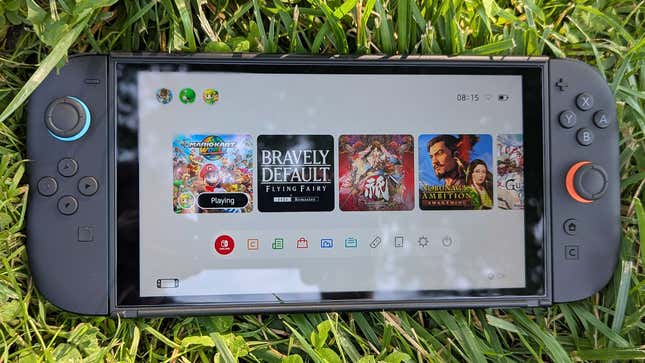
A Switch 2 sits on the grass.

Photo<!-- -->: <!-- -->Kotaku

The Switch 2 has a ton of new features and a much more detailed list of settings you can tinker with than its predecessor. Here are four you should change right from the jump to improve your overall experience with Nintendo’s new Mario Kart World machine. Just go into the settings menu inside the gear icon near the bottom right of the home screen to get started.

Nintendo Switch 2 Could Launch With Almost No Reviews

Calibrate HDR and turn it off for games that don’t support it

The Switch 2 offers upgraded visuals, including HDR (high dynamic range). It’s supposed to make the picture quality more vibrant with darker darks and lighter lights, but it can also make games look washed out if they don’t support it. Oddly, the Switch 2 turns HDR on by default for everything. Fortunately, you can toggle it to only turn on for games that support it. You’ll also want to calibrate HDR for your TV display when the Switch 2 is docked. You can do that by using one of those dials where you keep going until the image is barely visible.

Automatically turn charging off to improve battery life

The Switch 2 contains a nice new option to have your battery life cap out around 90 percent when you’re charging it. This is to help extend the overall life of the battery, and it’s ability to retain a charge years down the road. Once again, it’s just another straightforward option you can toggle to from the settings menu, and you can always go back and fully charge up before a trip or another extended period of being away from an outlet.

Turn off this one internet setting to boost download speeds over Wi-Fi

Nitnendo’s new hardware supports the new internet protocol IPv6. Unfortunately, in practice, having that active as part of your Wi-Fi internet connection seems to slow speeds down by not automatically connecting to faster wireless signals. The good news is that players seem to have been able to bypass the mystery issue by going to internet settings for their network and toggling the IPv6 slot off entirely. Anecdotally, that seems to allow players to connect to 5G networking speeds. Lots of players are having issues with Wi-Fi speeds though, suggesting Nintendo might need to deploy a bigger fix in the coming weeks.

Check your Switch 2 controllers for updates

Unlike some other consoles, the Switch 2 doesn’t appear to automatically push out new updates for accessories like the Joy-Con or new Pro controller. As a result, players need go into the settings menu and occasionally check if there’s anything new to download. You can a still play games with older-version hardware, but anything that’s not fully updated could be prone to bugs or performance flaws that wouldn’t otherwise pop up.

Turn off manually unlocking the screen

The first time your Switch 2 goes into sleep mode you’ll need to pump the A button several times before the console comes back on. Turning manual off will make it so you no longer have to press the A button three times to unlock the screen. That’s a nice thing to bypass considering the Switch 2 is the tiniest bit sluggish when waking up from sleep, taking a few seconds extra to notice controller inputs. Now, if only you could turn the locked screen off entirely.

.

You Might Also Like

Cult Hit Doki Doki Literature Club Fights Removal From Google Play Store Over ‘Depiction Of Sensitive Themes’

Dead as Disco Launches Into Early Access on May 5th, Groovy New Gameplay Released

Don’t Starve Elsewhere, A New Addition to Klei’s Survival Franchise, Announced for PC

A new Borderlands game just dropped, and it's free

Metal Gear Solid Film Greenlit By Sony, First Look in the Works

TAGGED: Game With PC, love games, pc
Share This Article
Facebook Twitter Copy Link
Previous Article Israeli navy attacks Yemen’s Houthi-held Hodeida port in first direct strikes from sea
Next Article ICE releases Honduran mother who was detained in Aurora for months after DoorDash delivery arrest
Leave a comment

Leave a Reply Cancel reply

Your email address will not be published. Required fields are marked *

- Advertisement -
Ad image

Latest News

JPMorgan CEO Jamie Dimon says he’s ‘learned and relearned’ to not make big decisions when he’s tired on Fridays
Business
Apple AI Pin Specs Leak: Dual Cameras, No Screen & More
Tech News
A ‘glass-like’ battlefield: German Army chief on the future of warfare
World News
Polymarket Sees Record $153M Daily Volume After Chainlink Integration
Crypto
Natasha Lyonne Then & Now: See Before & After Photos of the Actress Here
Celebrity
Cult Hit Doki Doki Literature Club Fights Removal From Google Play Store Over ‘Depiction Of Sensitive Themes’
Gaming News
Dead as Disco Launches Into Early Access on May 5th, Groovy New Gameplay Released
Gaming News

About Us

Welcome to Viraltrendingcontent, your go-to source for the latest updates on world news, politics, sports, celebrity, tech, travel, gaming, crypto news, and business news. We are dedicated to providing you with accurate, timely, and engaging content from around the globe.

Quick Links

  • Home
  • World News
  • Politics
  • Celebrity
  • Business
  • Home
  • World News
  • Politics
  • Sports
  • Celebrity
  • Business
  • Crypto
  • Gaming News
  • Tech News
  • Travel
  • Sports
  • Crypto
  • Tech News
  • Gaming News
  • Travel

Trending News

cageside seats

Unlocking the Ultimate WWE Experience: Cageside Seats News 2024

Investing £5 a day could help me build a second income of £329 a month!

JPMorgan CEO Jamie Dimon says he’s ‘learned and relearned’ to not make big decisions when he’s tired on Fridays

cageside seats
Unlocking the Ultimate WWE Experience: Cageside Seats News 2024
May 22, 2024
Investing £5 a day could help me build a second income of £329 a month!
March 27, 2024
JPMorgan CEO Jamie Dimon says he’s ‘learned and relearned’ to not make big decisions when he’s tired on Fridays
April 10, 2026
Brussels unveils plans for a European Degree but struggles to explain why
March 27, 2024
© 2024 All Rights reserved | Powered by Vraltrendingcontent
  • About Us
  • Contact US
  • Disclaimer
  • Privacy Policy
  • Terms of Service
Welcome Back!

Sign in to your account

Lost your password?