




Applying for jobs can feel like a full-time job in itself — sending resumes into the void, rewriting cover letters for every listing, and wondering if anyone even reads applications anymore. Trust me, I’ve been there.
That’s why when I heard about Undetectable AI’s new Smart Applier, I had to check it out. The pitch? Create a single profile, set your preferences, and let their bot do the heavy lifting across ZipRecruiter, LinkedIn, and Indeed. Sounds like a dream, right?
Of course, I was skeptical. Auto-applying for jobs sounds either like pure genius or a disaster waiting to happen. Is it actually smart enough to apply to the right jobs? Will it fill in weird fields with the wrong info and accidentally apply me to a forklift driver position? Only one way to find out.
So, I gave it a test run — from setting up the profile to watching it apply in real-time — and here’s everything you need to know before you decide if it’s worth your time (and credits).

What is Undetectable AI?
If you’re ever worried about getting falsely accused of using AI, then Undetectable AI should be your go-to option for an AI paraphrasing tool. This AI humanizer takes text as input and then paraphrases it into something that reads more human by removing telltale signs of AI and adding intentional mistakes…

…or, at least, that’s what I would normally say. Since last year, Undetectable AI has been improving their platform by adding more and more features, including an AI essay writer, SEO writer, chatbot, translator, and the star of our today’s article: their smart applier.
What is Undetectable AI’s Smart Applier?
Undetectable AI’s smart applier is different from their other features. It doesn’t aim to bypass AI detection (though I’m sure it can) but to make job applications easier. It takes your basic information, creates a profile, and lets you automate applications on job board sites like ZipRecruiter, LinkedIn, and Indeed.

How Does It Work?
This is how Undetectable AI’s smart applier works and my general experience using it. But before you proceed, make sure that you have enough Undetectable AI credits to use this tool.
Once you do, you can now open their smart applier feature, which directs you to this page.

You can choose to:
- Create your own profile from scratch or with your resume.
- Import your profile from LinkedIn, Indeed, or ZipRecruiter.
I personally chose to create a new profile from scratch since I’ll be using a dummy to test this tool.

The first thing you’ll need to input is your personal information, including your name, job title, phone number, email address, LinkedIn or Indeed Profile, and more. It’s kind of a long process, but remember, the goal here is to make a resume.

Once you’re done, you’re now going to need to create your professional summary. What’s your job title? How long have you been a working professional? What’s your story?

Next, it’s time for your professional and academic experience. These are pretty straightforward — you just need to populate the empty fields with information. One thing I particularly like about this tool is a small feature that lets you generate a work description based on your role and company.


Now, for skills, you can input your own skills, but Undetectable AI also lists several skills under a primary skill which you can choose from. For example, “data science” lists choices like machine learning, modeling, analysis, visualization, Python, NLP, and more.


The last part is the job filter that lets you add parameters to which jobs you’re looking for. This includes your expected salary, the role’s experience level, location, location type, and job type.

By now, you should have a profile. Now what?
The next thing you’ll need to do is to download Undetectable AI’s Auto Job Applier Chrome Extension. You can get it here.

Once you’ve installed the extension into your device, head back to Undetectable AI’s page and press “Start Job Applications.”

This should automatically open ZipRecruiter into your device. Don’t do anything and just watch your screen. Your browser should be moving independently and looking through several job applications. Once it finds one that fits the filters you set, it should be applying automatically using your information.

Here’s what it looks like in action:
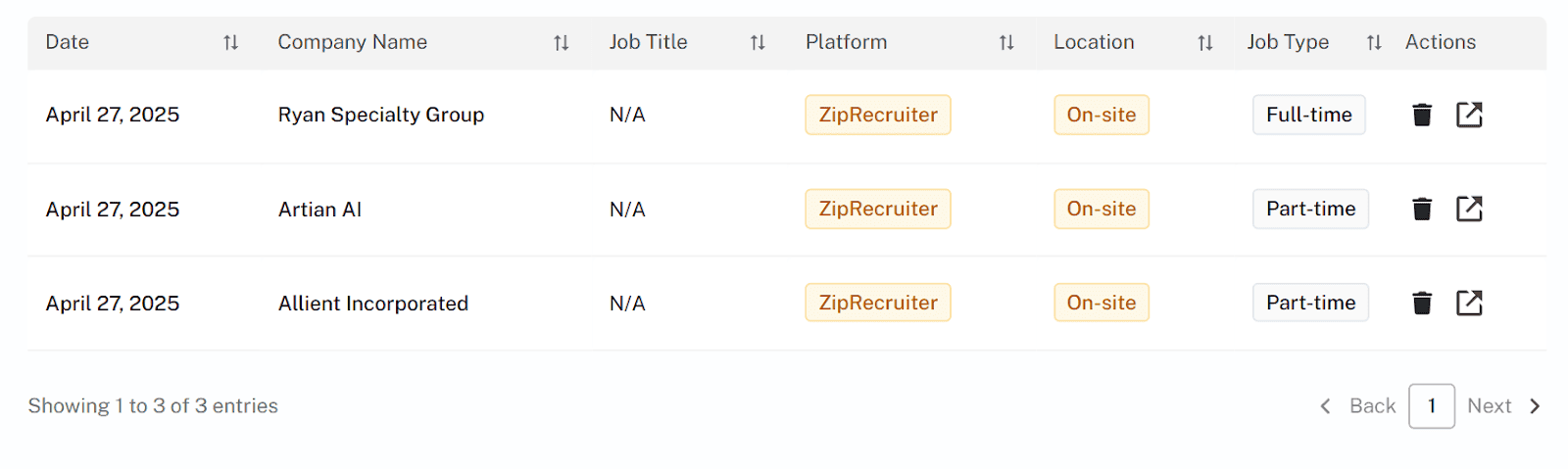
You can choose to end this process anytime you want. All jobs you’ve applied for will be logged into the Smart Applier page and you can track your application progress from there.
Overall, I’d say that my experience with this feature is pretty smooth — but it could be improved. The profile making page was a bit clunky, especially when I tried filling it with resume information and I also had a hard time removing the wrong resume I uploaded.
Pros and Cons of Undetectable AI’s Smart Applier
|
|
My Overall Thoughts
If you’re serious about landing a job without losing your sanity, Undetectable AI’s Smart Applier is a tool worth looking into. It’s not perfect — the setup can be a little clunky and the application speed isn’t lightning-fast — but it nails the most important thing: saving you time.
Instead of manually applying to dozens of jobs a day, you can focus on preparing for interviews, polishing your LinkedIn, or, you know, breathing. That alone makes it worth considering if you’re deep in the job hunt grind.
That being said, there’s definitely room for improvement. I’d love to see a smoother resume upload process, a quicker autofill speed, and maybe a clearer tutorial for people who aren’t as tech-comfortable. Nothing deal-breaking — but things that could make the experience even better.
Overall? It’s a solid early version of what could become an essential tool for job seekers everywhere. If you’re tired of shouting into the job board void, Smart Applier might just be your shortcut to getting noticed.


