




Is the dream of combining laptop portability with desktop-level gaming finally within reach? External GPUs (eGPUs) have long promised to bridge this gap, but for years, they’ve been plagued by limitations like bandwidth bottlenecks, bulky enclosures, and steep price tags. Now, with the arrival of Thunderbolt 5 and other advancements, the conversation is shifting. In this guide, Jarrod’sTech explains how eGPU setups have evolved and whether they can now deliver the performance gamers have been waiting for. From higher resolutions like 1440p and 4K to the convenience of plug-and-play setups, the potential is undeniable, but so are the trade-offs.
This feature dives into the practicalities, challenges, and breakthroughs of eGPU gaming in 2026. You’ll discover how connection types like Thunderbolt 5 and PCIe impact performance, why resolution matters more than ever, and whether the cost of an eGPU setup is justified for your needs. Along the way, we’ll explore the hidden compromises that could make or break your gaming experience. Whether you’re a casual gamer or a performance enthusiast, this breakdown will help you decide if eGPU gaming is finally worth the hype, or still a niche solution with too many strings attached.
eGPU Gaming : Worth It?
TL;DR Key Takeaways :

- eGPUs enhance laptop gaming by connecting a desktop GPU via Thunderbolt or PCIe, improving performance for higher resolutions like 1440p and 4K.
- Connection type significantly impacts performance: Thunderbolt 5 offers better bandwidth than Thunderbolt 4, while PCIe provides near-desktop-level performance but requires physical laptop modifications.
- eGPU setups perform best at higher resolutions (1440p and 4K), but bandwidth limitations make them less effective for 1080p gaming compared to high-performance internal GPUs.
- Challenges include bandwidth constraints, added bulk from enclosures, physical modifications for PCIe setups, and high costs, making eGPUs less practical for many users.
- eGPU setups are ideal for users prioritizing portability and already owning a compatible laptop, but dedicated gaming desktops or laptops remain more cost-effective for most gamers.
What is an eGPU & How Does It Work?
An eGPU setup allows you to connect a desktop GPU to your laptop, typically through a Thunderbolt port or, in some cases, via a PCIe connection through an M.2 slot. The primary purpose is to offload graphical processing from the laptop’s internal GPU to a more powerful external one. This can lead to improved frame rates, support for higher resolutions like 1440p or 4K, and the ability to upgrade your GPU without replacing the entire laptop.
The effectiveness of an eGPU setup, however, depends heavily on the type of connection and the bandwidth it provides. These factors directly influence how efficiently the external GPU communicates with your laptop, affecting overall performance. While the concept is appealing, the practical implementation comes with both benefits and limitations.
Connection Types and Their Impact on Performance
The type of connection between your laptop and the eGPU is a critical factor in determining how much performance you can extract from the setup. Here’s a closer look at the most common connection options:
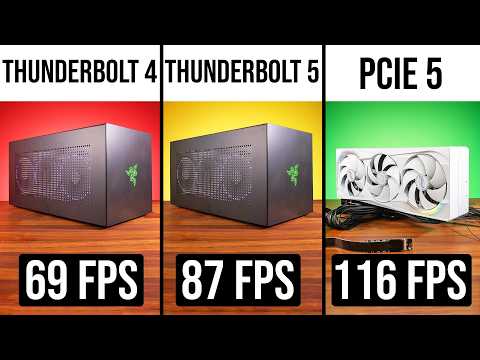
- Thunderbolt 4: This widely available connection is convenient but limited in bandwidth. As a result, it often leads to reduced performance compared to desktop GPUs or high-end laptop GPUs. This limitation becomes more noticeable in graphically intensive games where higher data transfer rates are required.
- Thunderbolt 5: The latest version of Thunderbolt technology doubles the bandwidth of Thunderbolt 4, offering a significant improvement in gaming performance. This is particularly advantageous at higher resolutions like 1440p and 4K, where the additional bandwidth allows the external GPU to operate closer to its full potential.
- PCIe (via M.2 slot): A direct PCIe connection provides even greater bandwidth than Thunderbolt 5, allowing near-desktop-level performance. However, this method requires physical modifications to your laptop, such as exposing the M.2 slot, which can compromise portability and ease of use.
Each connection type has its trade-offs, with Thunderbolt offering convenience and PCIe delivering superior performance at the cost of practicality.
eGPU Gaming vs Laptops : Real FPS at 1080p, 1440p and 4K
Take a look at other insightful guides from our broad collection that might capture your interest in External GPU (eGPU).
Performance Across Different Resolutions
The performance of an eGPU setup varies significantly depending on the resolution and the GPU being used. Here’s how eGPU setups typically perform across different resolutions:
- 1080p Gaming: At this resolution, laptops with high-performance internal GPUs often outperform eGPU setups. The bandwidth limitations of Thunderbolt 4 and 5, combined with data transfer overhead, can diminish the potential FPS gains, making eGPUs less effective for 1080p gaming.
- 1440p Gaming: Thunderbolt 5 begins to show its strengths at this resolution, especially when paired with an external monitor. While eGPU setups can surpass laptop GPUs in average FPS, occasional performance inconsistencies, such as frame drops, may still occur.
- 4K Gaming: At 4K, the raw power of a desktop GPU in an eGPU setup becomes more apparent. However, even at this resolution, PCIe connections outperform Thunderbolt-based setups, delivering smoother and more stable performance.
The choice of resolution plays a significant role in determining whether an eGPU setup is a worthwhile investment, with higher resolutions generally benefiting more from the additional power of a desktop GPU.
Challenges of Using an eGPU
Despite their potential, eGPU setups come with several challenges that may limit their appeal to a broader audience. These include:
- Bandwidth Constraints: Thunderbolt-based eGPUs are easy to set up, but their performance is limited by the bandwidth of the connection. This can result in diminished returns, particularly for high-end GPUs that require more data throughput to perform optimally.
- Physical Modifications: PCIe-based setups require you to physically modify your laptop, such as exposing the M.2 slot. This compromises the portability and convenience that laptops are known for, making it a less practical option for many users.
- Added Bulk: eGPU enclosures, such as the Razer Core X V2, add significant bulk to your setup. These enclosures also require a dedicated power supply, further reducing the portability of your laptop.
These challenges highlight the trade-offs involved in adopting an eGPU setup, which may not align with the needs of all users.
Cost Considerations
The financial investment required for an eGPU setup can be substantial. In addition to purchasing a high-performance desktop GPU, you’ll need an eGPU enclosure, which can cost several hundred dollars. When combined with the price of a compatible laptop featuring Thunderbolt 4 or 5, the total cost often exceeds that of a dedicated gaming desktop or a high-end gaming laptop.
For budget-conscious users, this makes eGPU setups a less attractive option. However, for those who already own a compatible laptop and prioritize portability, the cost may be justifiable.
Is an eGPU Setup Right for You?
While advancements like Thunderbolt 5 have improved the viability of eGPU gaming, the technology still faces significant limitations. Bandwidth constraints, high costs, and practical challenges make eGPU setups a niche solution rather than a mainstream alternative.
For most gamers, a dedicated gaming desktop or laptop remains a more practical and cost-effective choice. However, if you already own a compatible laptop and value portability, an eGPU setup could be a worthwhile investment, particularly for higher resolutions like 4K. Ultimately, the decision depends on your performance needs, budget, and willingness to navigate the complexities of eGPU technology.
Media Credit: Jarrod’sTech
Latest viraltrendingcontent Gadgets Deals
Disclosure: Some of our articles include affiliate links. If you buy something through one of these links, viraltrendingcontent Gadgets may earn an affiliate commission. Learn about our Disclosure Policy.


