
By using this site, you agree to the Privacy Policy and Terms of Use.
Accept
Viral Trending contentViral Trending content
  • Home
  • World News
  • Politics
  • Sports
  • Celebrity
  • Business
  • Crypto
  • Gaming News
  • Tech News
  • Travel
Reading: How to use YouTube Picture-in-Picture in the UK
Notification Show More
Viral Trending contentViral Trending content
  • Home
  • Categories
    • World News
    • Politics
    • Sports
    • Celebrity
    • Business
    • Crypto
    • Tech News
    • Gaming News
    • Travel
  • Bookmarks
© 2024 All Rights reserved | Powered by Viraltrendingcontent
Viral Trending content > Blog > Tech News > How to use YouTube Picture-in-Picture in the UK
Tech News

How to use YouTube Picture-in-Picture in the UK

By Viral Trending Content 5 Min Read
Share
SHARE

I love using YouTube for long-form content like video essays and vlogs. However, sometimes I want to multitask while I’m diving down a rabbit hole about some weird internet culture trend or crazy fandom theory. 

Contents
How to watch a YouTube video via picture-in-picture  Can you use YouTube picture-in-picture in the UK? 

Previously I didn’t think this was possible without buying a YouTube Premium subscription. However, I accidentally stumbled across a hack while testing something for another article (the grind never stops). Fortunately, it’s one of the best accidental discoveries I’ve made, and very easy to do.  

How to watch a YouTube video via picture-in-picture  

If you’ve not heard of picture-in-picture (PiP) before, this is a techy term for shrinking a YouTube video down so you can access other parts of your phone screen.  

While some smartphones like iPhone have this ability with YouTube if you watch via a browser such as Safari, you may want to stay in the YouTube app due to its more streamlined interface.  

Fortunately, YouTube does offer this feature. The catch? It’s exclusive to those in the US.  

If you’re an American reader, all you need to do is enable the PiP mode in your settings. When watching a video, exit the app (perhaps by clicking on your Home button on Android), and then the video will automatically shrink.  

But what about the rest of us chumps in the UK and outside of the US? 
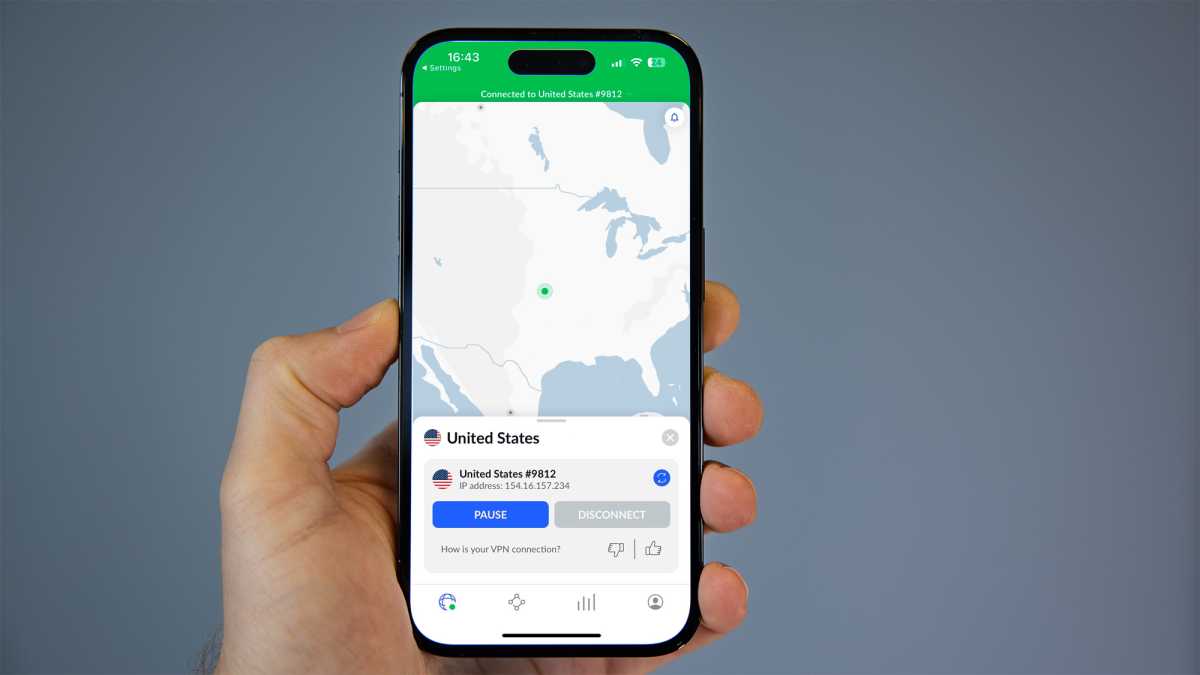
NordVPN iPhone app

NordVPN iPhone app

Dominik Tomaszewski / Foundry

NordVPN iPhone app

Dominik Tomaszewski / Foundry

Dominik Tomaszewski / Foundry

Can you use YouTube picture-in-picture in the UK? 

Yes, you can use YouTube PiP in the UK – all you need is a VPN.  

This stands for virtual private network. This software reroutes you IP address so you can browse the internet as if you’re from another country. However, there are plenty of other reasons you might want to use a VPN.  

For this tutorial I used a NordVPN, Tech Advisor’s top-rated provider. However, there are plenty of other options out there that we as a team have tried and tested.

This is cheaper than subscribing to YouTube Premium, and will also give you loads of other benefits such as the ability to watch Netflix US.

Once you’ve chosen your VPN, here’s what you should do:

  • If you have YouTube open, close the app 
  • Connect to a US server on your VPN 
  • Open the YouTube app, click on the ‘You’ icon in the bottom right 
  • Click on the gear icon on the top right 
  • Tap ‘General’ and then toggle on ‘Picture-in-picture mode’ if it’s not enabled 
  • Find the video you want and click play 
  • Exit the app, and the video should minimise 
  • Pinch the video to adjust the size or move it on your screen 
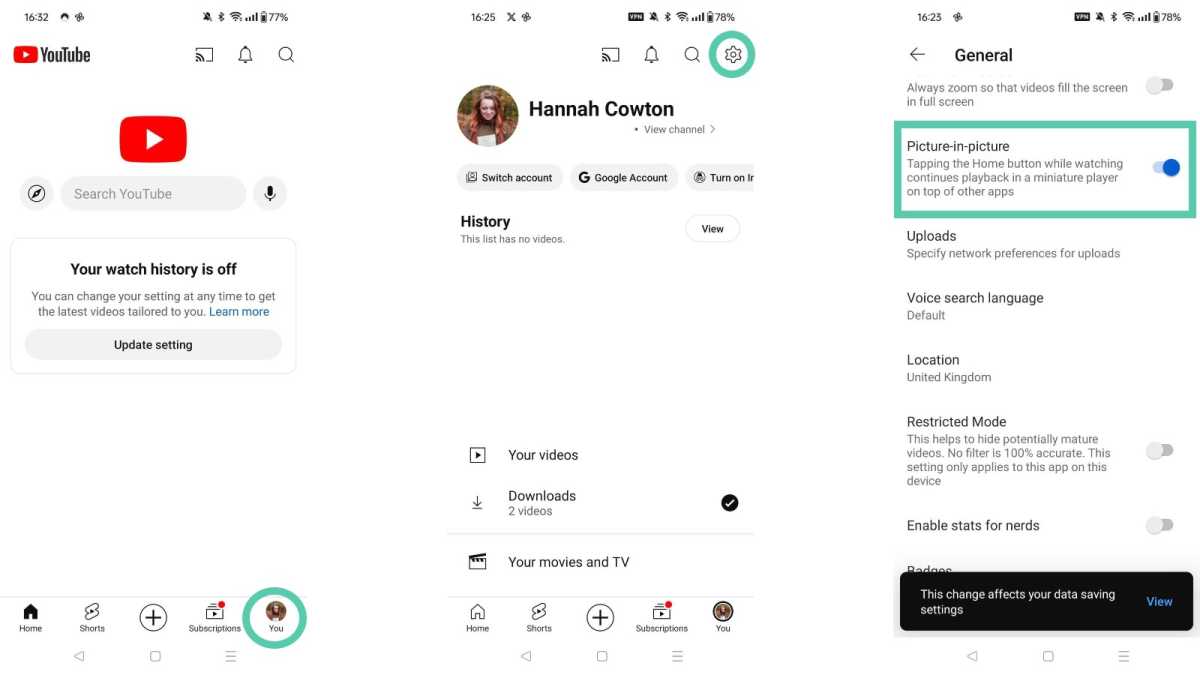
YouTube PiP settings

YouTube PiP settings

Hannah Cowton / Foundry

YouTube PiP settings

Hannah Cowton / Foundry

Hannah Cowton / Foundry
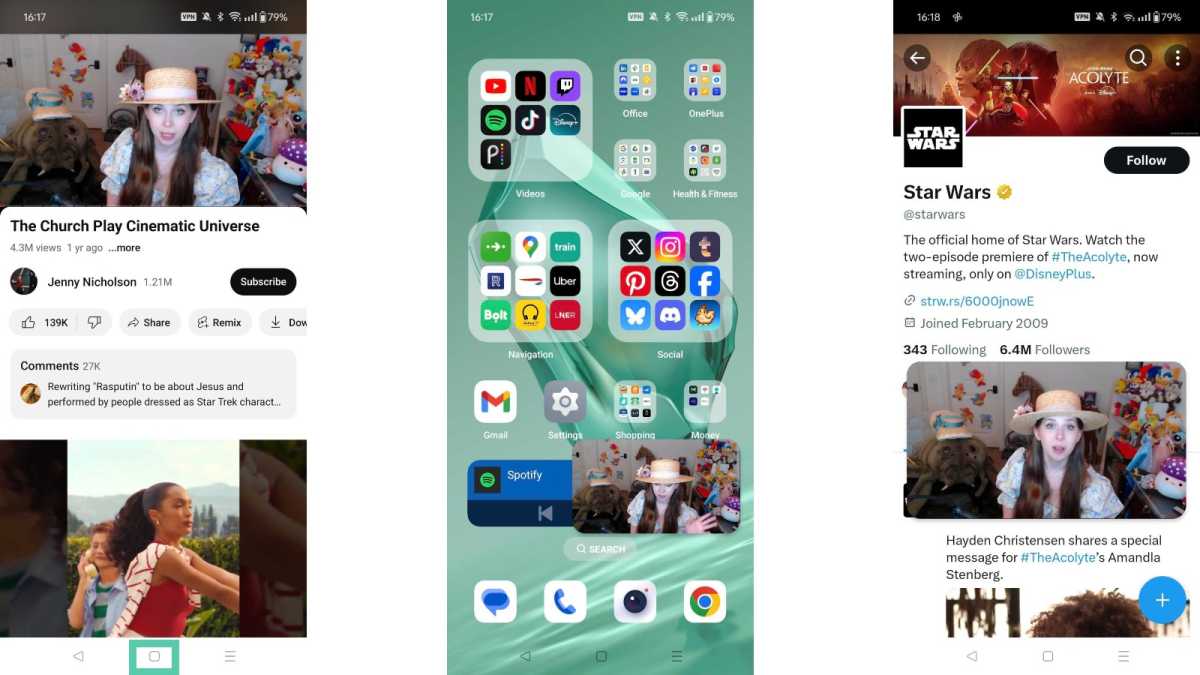
YouTube PiP on an Android phone

YouTube PiP on an Android phone

Hannah Cowton / Foundry

YouTube PiP on an Android phone

Hannah Cowton / Foundry

Hannah Cowton / Foundry

Based on my experience, you should always close a video (even if you’re mid-watch) to get this method to work.

If you want to go back into the app once you’ve enabled PiP, click once on the video and then tap the maximise icon in the centre of the video. I also didn’t need to toggle on the PiP setting in the app – it was enabled by default.  

I used a OnePlus 12 running on Android 14 for this hack, but according to Google, this should also work on iPhone and iPad.  

As I mentioned earlier, I stumbled across this when I was using my phone for another streaming guide, and I went to exit YouTube. I was quite surprised when I saw the PiP feature and did some digging. Naturally, I just had to share my findings with TA readers.  

This method is perfect for long videos, such as Jenny Nicholson’s viral Star Wars hotel video essay. You can also read up on how to minimise a YouTube video on iPhone to play just the audio while your screen is locked.  

You Might Also Like

Apple AI Pin Specs Leak: Dual Cameras, No Screen & More

The diverse responsibilities of a principal software engineer

OpenAI Backs Bill That Would Limit Liability for AI-Enabled Mass Deaths or Financial Disasters

Google’s Fitbit Tease has me More Excited for Garmin’s Whoop Rival

Why the TCL NXTPAPER 14 Is One of the Best Tablets for Musicians and Sheet Music Reading

TAGGED: cool tech, latest technology, latest technology news, new technology, science and technology, tech, Tech News, tech review, technews, technological advances, technology definition, technology reviews, what is technology
Share This Article
Facebook Twitter Copy Link
Previous Article European elections: Three things that could disrupt the status quo in Brussels
Next Article New Colorado law will require more training for gun owners to get concealed-carry permits
Leave a comment

Leave a Reply Cancel reply

Your email address will not be published. Required fields are marked *

- Advertisement -
Ad image

Latest News

JPMorgan CEO Jamie Dimon says he’s ‘learned and relearned’ to not make big decisions when he’s tired on Fridays
Business
Apple AI Pin Specs Leak: Dual Cameras, No Screen & More
Tech News
A ‘glass-like’ battlefield: German Army chief on the future of warfare
World News
Polymarket Sees Record $153M Daily Volume After Chainlink Integration
Crypto
Natasha Lyonne Then & Now: See Before & After Photos of the Actress Here
Celebrity
Cult Hit Doki Doki Literature Club Fights Removal From Google Play Store Over ‘Depiction Of Sensitive Themes’
Gaming News
Dead as Disco Launches Into Early Access on May 5th, Groovy New Gameplay Released
Gaming News

About Us

Welcome to Viraltrendingcontent, your go-to source for the latest updates on world news, politics, sports, celebrity, tech, travel, gaming, crypto news, and business news. We are dedicated to providing you with accurate, timely, and engaging content from around the globe.

Quick Links

  • Home
  • World News
  • Politics
  • Celebrity
  • Business
  • Home
  • World News
  • Politics
  • Sports
  • Celebrity
  • Business
  • Crypto
  • Gaming News
  • Tech News
  • Travel
  • Sports
  • Crypto
  • Tech News
  • Gaming News
  • Travel

Trending News

cageside seats

Unlocking the Ultimate WWE Experience: Cageside Seats News 2024

Investing £5 a day could help me build a second income of £329 a month!

JPMorgan CEO Jamie Dimon says he’s ‘learned and relearned’ to not make big decisions when he’s tired on Fridays

cageside seats
Unlocking the Ultimate WWE Experience: Cageside Seats News 2024
May 22, 2024
Investing £5 a day could help me build a second income of £329 a month!
March 27, 2024
JPMorgan CEO Jamie Dimon says he’s ‘learned and relearned’ to not make big decisions when he’s tired on Fridays
April 10, 2026
Brussels unveils plans for a European Degree but struggles to explain why
March 27, 2024
© 2024 All Rights reserved | Powered by Vraltrendingcontent
  • About Us
  • Contact US
  • Disclaimer
  • Privacy Policy
  • Terms of Service
Welcome Back!

Sign in to your account

Lost your password?