




Summary created by Smart Answers AI
In summary:
- Tech Advisor explains how Android users can empty their device’s Recycle Bin to optimize storage and maintain performance.
- The process involves locating your phone’s file manager app, typically called ‘Files’ or ‘My Files’, or downloading one from Play Store.
- Users should navigate to the ‘Recycle Bin’ or ‘Cleaner’ section and select items like cache or obsolete files to delete permanently.
On PCs and laptops, the Recycle Bin is a given. On Android phones, many people look for it in vain, but it does exist. Deleted photos, videos and files are stored there temporarily, which is handy if you’ve accidentally deleted something.
However, it also takes up storage space and can slow your phone down. Here, we’ll show you where the Recycle Bin is on Android, how to find it and how to empty it properly.

Emptying the Recycle Bin via the file manager
First, open your smartphone’s file manager. If you can’t find it straight away, use the search function: swipe down on the home screen and type in terms such as “Files”, “My Files” or “File Manager”.
The name and visual appearance will vary depending on the manufacturer due to different Android user interfaces, but it should roughly be the same between Samsung, Google, Xiaomi and other brands.
If no file manager is pre-installed, we recommend this free file manager app from the Play Store.
Here’s how to empty the Recycle Bin:
- Open the file manager.
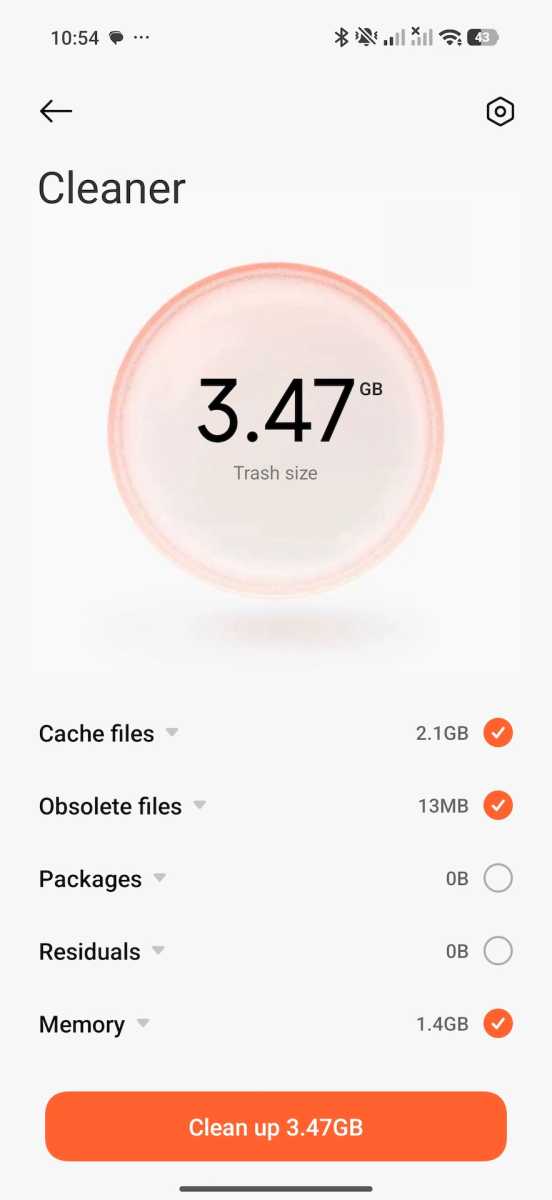
- Tap the three-dot icon or the menu in the top-left corner and select ‘Recycle Bin’. In some file managers, you may see it called ‘Cleaner’, ‘Clean up’ or similar (see main image above).
- If given the option (as below) choose which items you want to delete, such as cache or obsolete files.
- Then tap ‘Delete all’, ‘Empty’, or ‘Clean up’ to empty the recycle bin.
Chris Martin / Foundry
What’s the point of emptying the Recycle Bin?
Deleted files continue to take up storage space on Android as long as they remain in the Recycle Bin. Depending on your usage habits, this can quickly add up to several gigabytes, especially if you’ve accumulated lots of photos and videos.
It will be particularly useful if your phone or tablet has completely run out of storage, meaning you can’t install any more apps or take any photos. As a bonus, it may also speed up the performance of your device.
This article originally appeared on our sister publication PC-WELT and was translated and adapted from German.


