




Although we’re still a few months off the official release of Android 15 – expected to overlap with the unveiling of Google’s Pixel 9 smartphone family – developers (and curious tech fans) do have a means of getting access to the pre-release beta version of Android 15, right now.
At the time of writing, Google has already served up two Developer Previews and two Beta releases of Android 15 since February 2024, each building on the previous in terms of both features and fixes.
Going by the roadmap Google released prior to DP1, Android 15’s Beta 3 is expected in June and looks set to shore up the platform’s stability ahead of further refinement with Beta 4 in July.
We don’t have further details from the company on any subsequent betas before Android 15’s complete and final release, but previous iterations of Android have received such treatment (there was an Android 14 Beta 5, for example), so it’s not out of the realm of possibility.

Provided you’re comfortable with running an experimental and unfinished build of Android on your device ahead of launch, however, Google already has an established process to flash the latest beta release today; so long as you have a compatible device which supports these developmental updates.
We’ll update this article with each subsequent beta release, but currently we’re focusing on how to download and install Android 15 Beta 2.1 on your phone.
Which phones support Android 15 right now?
It should come as no surprise that the first place to look for Android 15-compatible smartphones is Google’s own Pixel devices. The below list can support the current beta release of Android 15:
It’s also worth noting that, for those curious about the tablet experience Android 15 will offer up, the Google Pixel Tablet is also compatible with the current Android 15 beta programme.
Which non-Pixel phones & tablets support the Android 15 beta?
If you’re keen to try out Android 15 but don’t have a compatible Pixel, worry not.
A handful of proactive device makers have signed up to become Android 15 ‘device-maker partners,’ meaning they also offer early access to Android 15, albeit with download methods, timeframes and sources that differ slightly to the Pixel method this article details.
Here’s the current shortlist of third-party Android phones that support Android 15 beta releases. You can click the brands themselves to access each device-makers’ respective download site:
Honor
iQoo
Lenovo
Nothing
OnePlus
Oppo
Realme
Sharp
Tecno
Vivo
Xiaomi
How to register to download the Android 15 beta on your phone
Before you can download the latest Android 15 beta to your device, you’ll need to sign in to the Android 15 beta site using your Google account and choose to ‘opt in’ on the device you want to install Android 15 on.
Here’s how to opt-in in a few simple steps:
- Head to the Android Beta for Pixel site (making sure you’re logged into your Google account)
- Scroll down to the Your eligible devices section
- Read the T&Cs and FAQs for answers to any queries you may have before you download and install
- Select Opt in on the device you want to install Android 15 on
- Then head over to your newly registered phone
WARNING: To quote the Android Beta site directly, “you will not be able to unenrol and revert back to a stable public version of Android without first wiping all locally saved data on your device. You may also encounter issues restoring a backup. We recommend reviewing the latest release notes for Pixel phones before enrolling in Android Beta.“
Provided you’re happy with this caveat, simply select Opt out under Your eligible devices, next to the device you previously selected Opt in on.
How to download the Android 15 beta on your phone
Foundry | Alex Walker-Todd
Foundry | Alex Walker-Todd
Foundry | Alex Walker-Todd
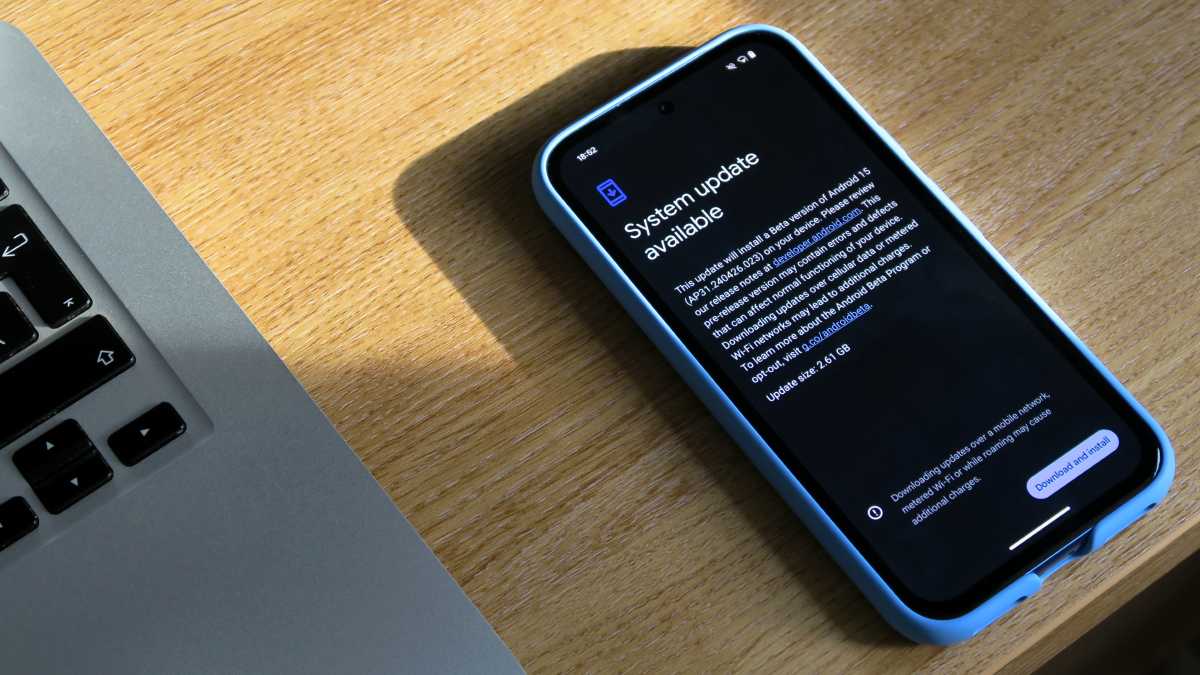
For Pixel users, there are two ways to download and install the latest beta, the easiest being an OTA (over-the-air) update, similar to how you would download a normal OS (operating system) update, by doing the following:
- Open the Settings menu
- Scroll down and tap System, located near the bottom of the list
- Tap Software updates
- Then tap System update
- Your Pixel will then check for available OTA updates (if it doesn’t check automatically, tap the Check for update button)
- Once it finds an available update ready to download, tap on the Download and install button in the bottom corner of the screen
On the off chance the beta update isn’t immediately available, check back in a few hours, or simply wait until your phone notifies you that the beta update is ready to download. The method is expected to be largely the same on other eligible Android phones, but there may be some variation.
Alternatively, you can download the update manually via the official Android Flash Tool. However, this is only recommended if you really can’t wait or don’t want to use the more convenient OTA method.

/origin-imgresizer.eurosport.com/2024/06/15/3988430-80944313-2560-1440.jpg?w=150&resize=150,150&ssl=1)


