
By using this site, you agree to the Privacy Policy and Terms of Use.
Accept
Viral Trending contentViral Trending content
  • Home
  • World News
  • Politics
  • Sports
  • Celebrity
  • Business
  • Crypto
  • Gaming News
  • Tech News
  • Travel
Reading: How To Add Telemetry (Temperature etc) Sensor To DIY ESP32 Meshtastic Device With BME280
Notification Show More
Viral Trending contentViral Trending content
  • Home
  • Categories
    • World News
    • Politics
    • Sports
    • Celebrity
    • Business
    • Crypto
    • Tech News
    • Gaming News
    • Travel
  • Bookmarks
© 2024 All Rights reserved | Powered by Viraltrendingcontent
Viral Trending content > Blog > Gaming News > How To Add Telemetry (Temperature etc) Sensor To DIY ESP32 Meshtastic Device With BME280
Gaming News

How To Add Telemetry (Temperature etc) Sensor To DIY ESP32 Meshtastic Device With BME280

By Viral Trending Content 4 Min Read
Share
SHARE
Meshtastic

Contents
HardwareAssemblyBME280 Telemetry Module → DIY ESP32 Meshtastic NodeMeshtastic SettingsConclusion

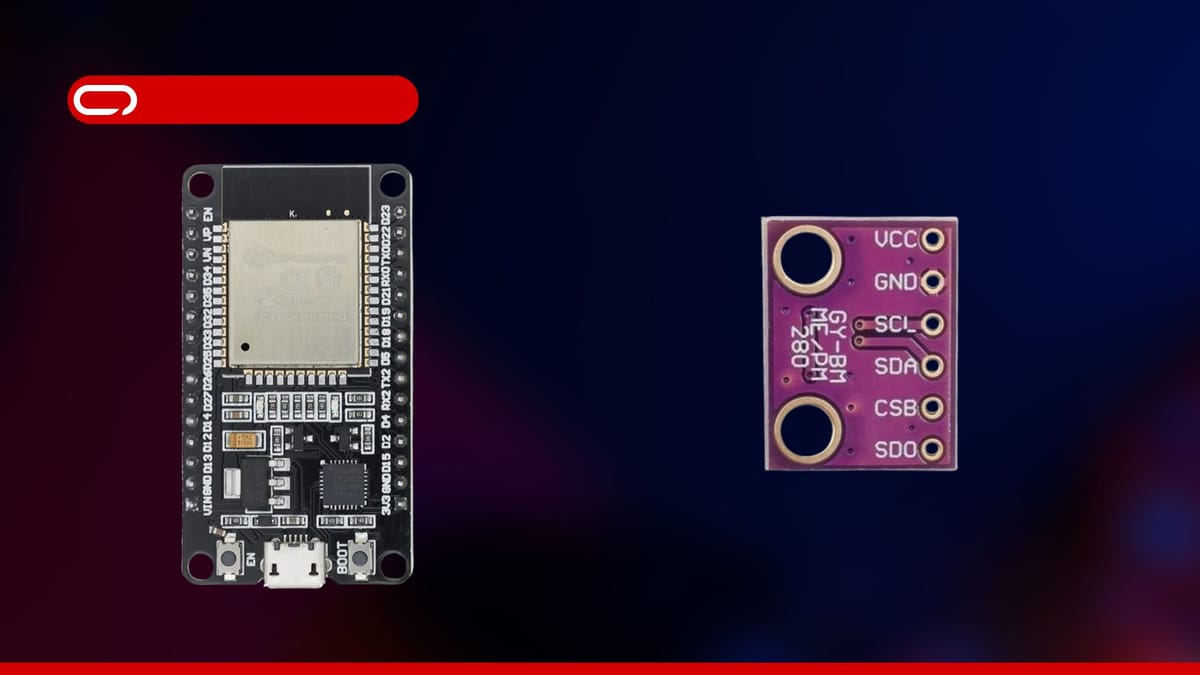
Learn how to add a BME280 sensor to your DIY ESP32 Meshtastic Node for real-time temperature, humidity, and air pressure monitoring. This guide covers hardware setup, wiring, and Meshtastic app settings—perfect for enhancing your LoRa mesh network with environmental data.

Adrelien

How To Add Telemetry (Temperature etc) Sensor To DIY ESP32 Meshtastic Device With BME280

In this guide, we’ll walk you through adding a telemetry sensor (BME280) module to your existing DIY ESP32 Meshtastic Node to measure air pressure, temperature, and humidity.

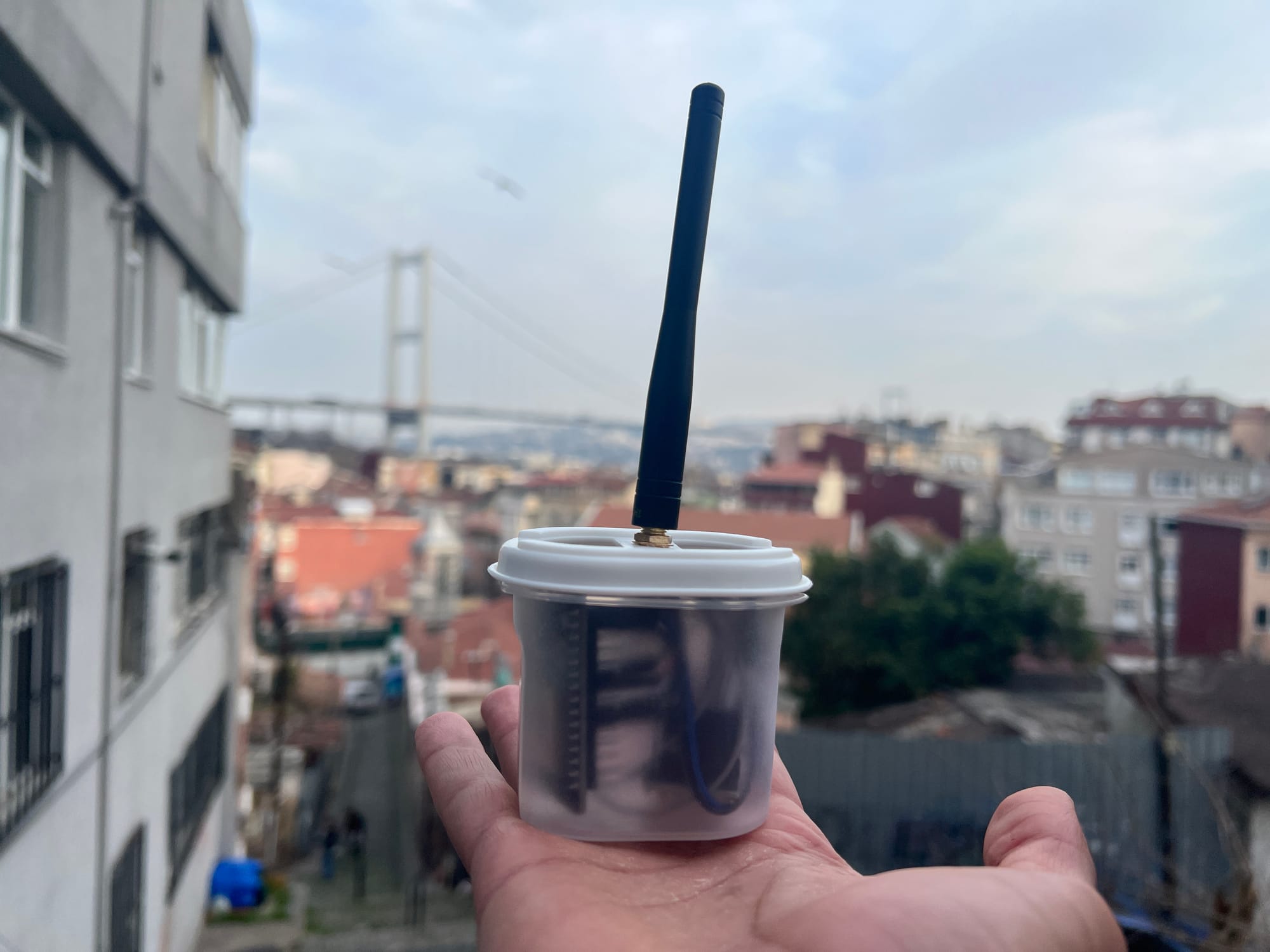
Meshtastic DIY – How To Build Your Own Meshtastic Node ESP32 & Lora Radio

Create your own Meshtastic LoRa Node with our easy DIY guide. A complete step-by-step for building your customized mesh communication system
Hardware

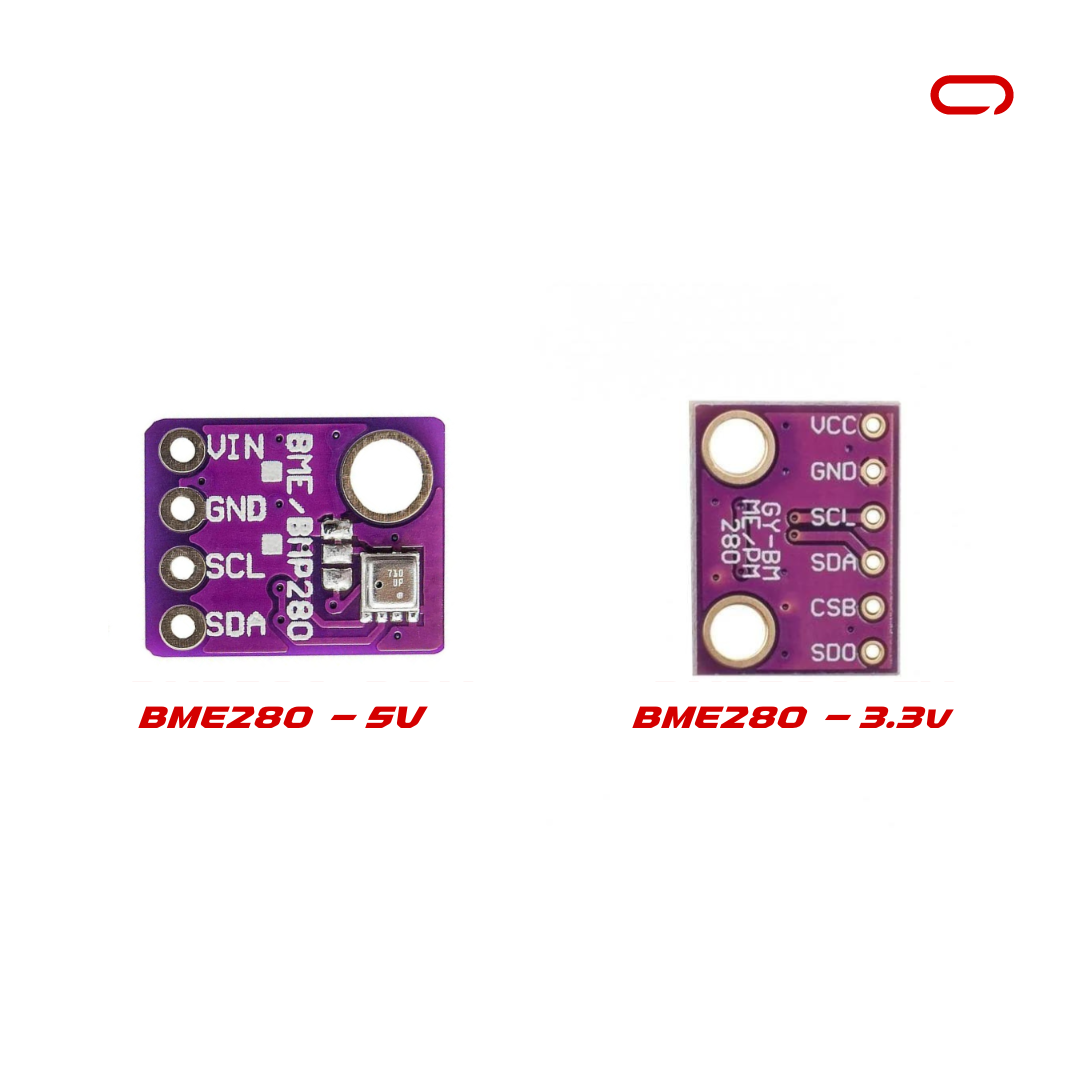
Now let’s get started with the hardware you need:
💡

BME280 sensor comes in two flavors 5V and 3.3V. Choose either 5V or 3.3V based on your system requirements

📢

When ordering from AliExpress, consider consolidating your purchases from a single seller to maximize savings. For instance, if you’re purchasing an antenna from seller X, check if they also offer an IPEX to SMA-K cable. By sourcing all your items from one seller, you can significantly reduce shipping costs.

While you can modify this hardware selection, we’ve chosen readily available components. Note that soldering is only required to attach headers to the ESP32 development board and the BME280 module. This step can be outsourced to a local electronics shop if you prefer to avoid soldering yourself.

Assembly

The hardware is all ready and set now to the wiring. For this, we will follow the following Schematics.

💡

Please keep in mind we are assuming here you already soldered the headers on the board so it will be a matter of connecting pins to the right place.
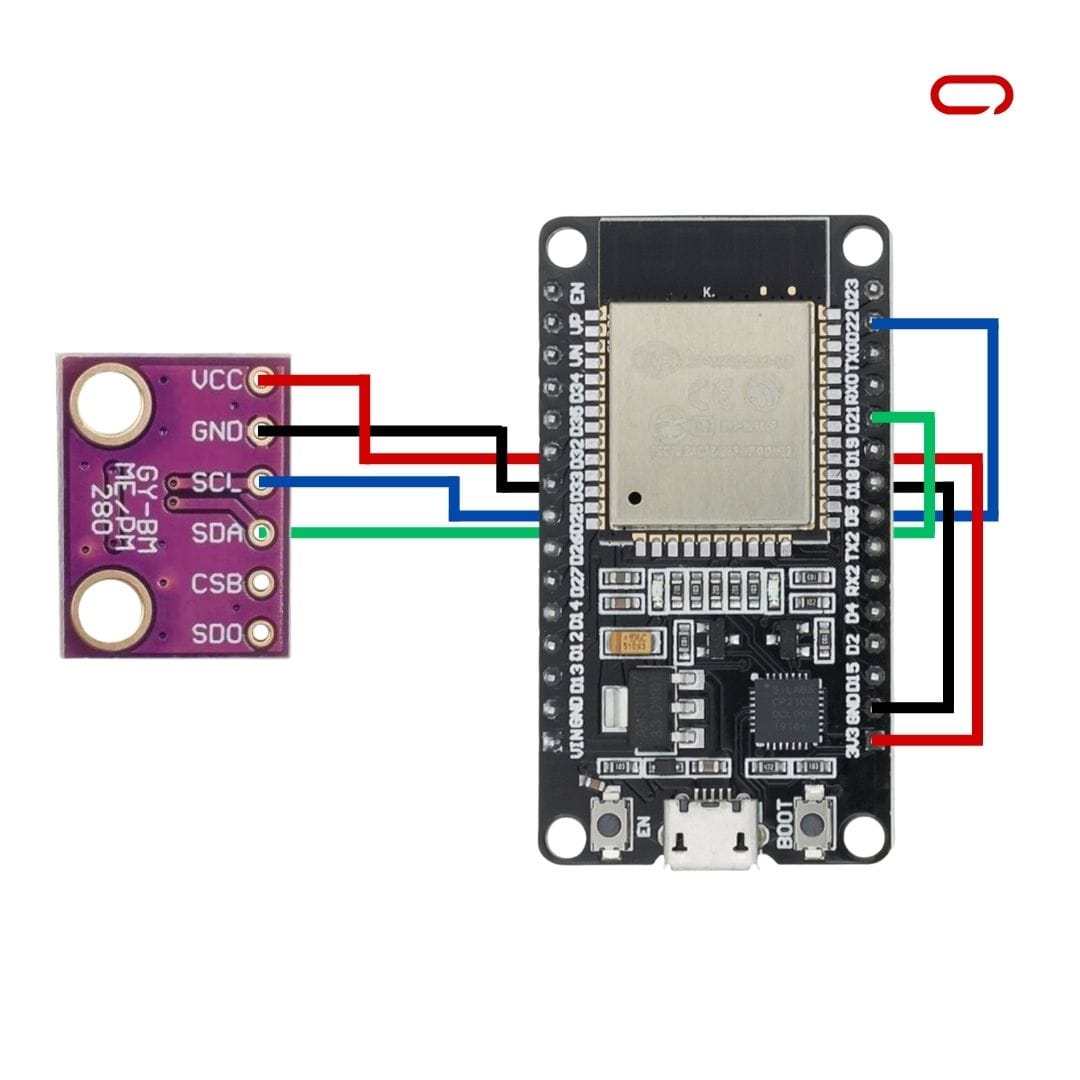
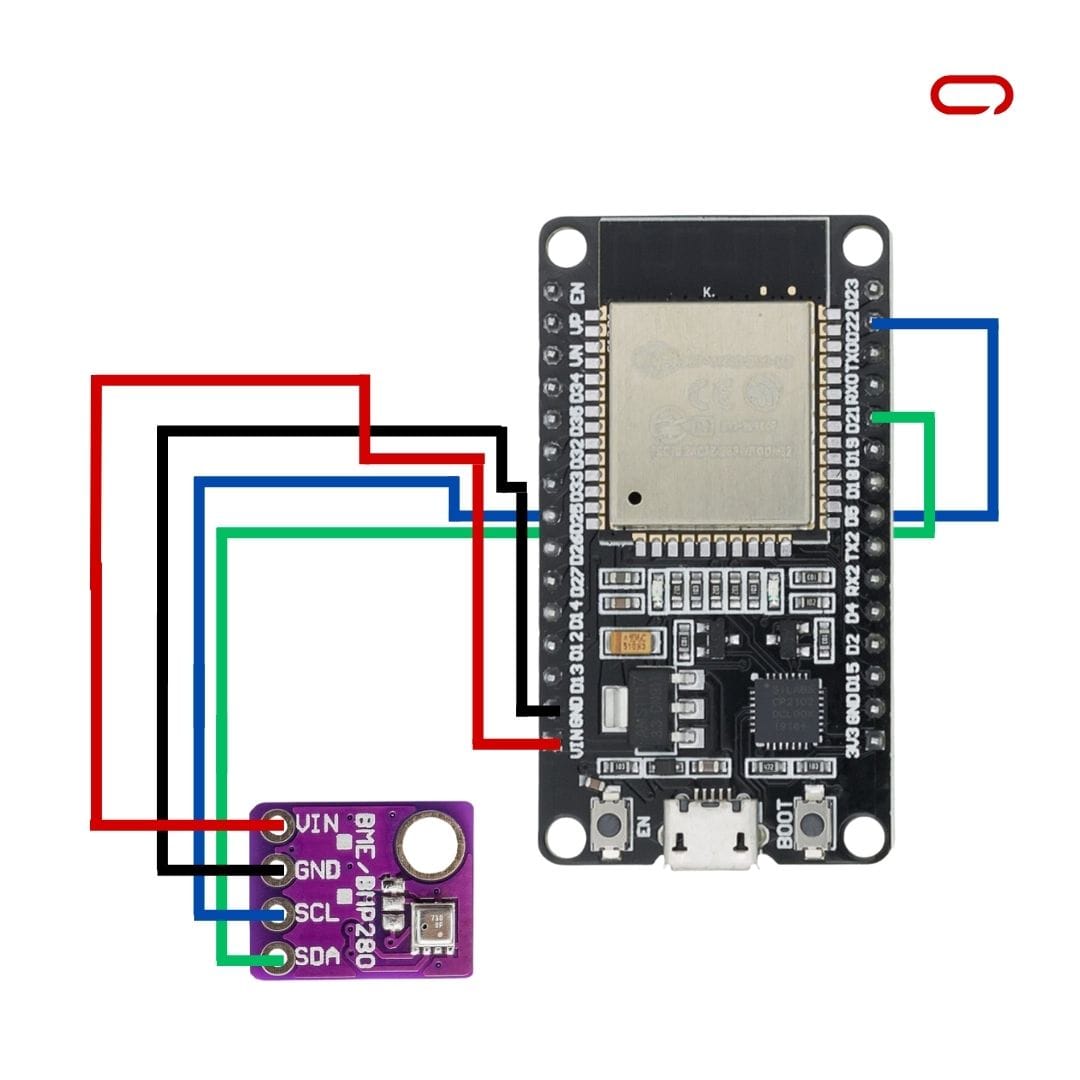
<span style="white-space: pre-wrap;">BME280-3.3V For The 3.3V Module</span>
<span style="white-space: pre-wrap;">BME280-5V For The 5V Module</span>

BME280 Telemetry Module → DIY ESP32 Meshtastic Node

  • VCC/VIN → 3.3V Pin
  • SCL → GPIO 22 (Default I2C Clock)
  • SDA → GPIO 21 (Default I2C Data)
  • GND → GND Pin

💡

If you have a display connected to the same I2C pins, you can connect the BME280 in parallel with the display.

💡

Adding decoupling capacitors is good practice to isolate different parts of the circuit from each other.

💡

Important Note: The exact pin layout may vary on your specific ESP32 board. Always follow the labels and pin designations on your components and the provided schematics to ensure accurate connections. Double-checking these details will help prevent potential issues or component damage.

After completing all connections, verify that they match the recommended configuration before proceeding to the next stage.

Meshtastic Settings

  1. Open Meshtastic App (IOS for this guide)
  2. Go to the Settings page
  3. In the module configuration section go to Telemetry (Sensor)
  4. Scroll down to the Sensor Options
  5. Toggle the switch Enable and other switches according to your preference

Conclusion

Adding a Telemetry module to your DIY ESP32 Meshtastic Node is a straightforward process that significantly enhances your device’s capabilities. The BME280 module provides reliable environmental monitoring at an affordable price, and the ESP32’s robust I2C implementation ensures stable communication. While some soldering may be required, this can be easily delegated to a local electronics shop if needed. By following this guide, you can successfully integrate environmental sensing functionality into your Meshtastic network, enabling the collection and sharing of temperature, humidity, and air pressure data across your mesh network. The ESP32 platform’s flexibility also allows for future expansion with additional sensors on the same I2C bus.

You Might Also Like

Cult Hit Doki Doki Literature Club Fights Removal From Google Play Store Over ‘Depiction Of Sensitive Themes’

Dead as Disco Launches Into Early Access on May 5th, Groovy New Gameplay Released

Don’t Starve Elsewhere, A New Addition to Klei’s Survival Franchise, Announced for PC

A new Borderlands game just dropped, and it's free

Metal Gear Solid Film Greenlit By Sony, First Look in the Works

TAGGED: PC Game, PC Online, xbox
Share This Article
Facebook Twitter Copy Link
Previous Article Solana Mobile to airdrop 20% of SKR tokens to Seeker phone users
Next Article Best of CES 2026 Awards: Tech Advisor’s Top Gadgets
Leave a comment

Leave a Reply Cancel reply

Your email address will not be published. Required fields are marked *

- Advertisement -
Ad image

Latest News

JPMorgan CEO Jamie Dimon says he’s ‘learned and relearned’ to not make big decisions when he’s tired on Fridays
Business
Apple AI Pin Specs Leak: Dual Cameras, No Screen & More
Tech News
A ‘glass-like’ battlefield: German Army chief on the future of warfare
World News
Polymarket Sees Record $153M Daily Volume After Chainlink Integration
Crypto
Natasha Lyonne Then & Now: See Before & After Photos of the Actress Here
Celebrity
Cult Hit Doki Doki Literature Club Fights Removal From Google Play Store Over ‘Depiction Of Sensitive Themes’
Gaming News
Dead as Disco Launches Into Early Access on May 5th, Groovy New Gameplay Released
Gaming News

About Us

Welcome to Viraltrendingcontent, your go-to source for the latest updates on world news, politics, sports, celebrity, tech, travel, gaming, crypto news, and business news. We are dedicated to providing you with accurate, timely, and engaging content from around the globe.

Quick Links

  • Home
  • World News
  • Politics
  • Celebrity
  • Business
  • Home
  • World News
  • Politics
  • Sports
  • Celebrity
  • Business
  • Crypto
  • Gaming News
  • Tech News
  • Travel
  • Sports
  • Crypto
  • Tech News
  • Gaming News
  • Travel

Trending News

cageside seats

Unlocking the Ultimate WWE Experience: Cageside Seats News 2024

Investing £5 a day could help me build a second income of £329 a month!

JPMorgan CEO Jamie Dimon says he’s ‘learned and relearned’ to not make big decisions when he’s tired on Fridays

cageside seats
Unlocking the Ultimate WWE Experience: Cageside Seats News 2024
May 22, 2024
Investing £5 a day could help me build a second income of £329 a month!
March 27, 2024
JPMorgan CEO Jamie Dimon says he’s ‘learned and relearned’ to not make big decisions when he’s tired on Fridays
April 10, 2026
Brussels unveils plans for a European Degree but struggles to explain why
March 27, 2024
© 2024 All Rights reserved | Powered by Vraltrendingcontent
  • About Us
  • Contact US
  • Disclaimer
  • Privacy Policy
  • Terms of Service
Welcome Back!

Sign in to your account

Lost your password?