




 At a glance
Expert’s Rating
Pros
- Powerful charging ports
- Fast data ports
- Up to two 4K at 60Hz
- Compact and lightweight
Cons
- No card reader
- Mac limitations
Our Verdict
Anker’s Prime 160W Charging Docking Station 14-in-1 USB-C Dock is a great combination of dual-display 10Gbps dock and desktop charging station.
Anker is famous for its wide range of charging products, and this laptop docking station is the most powerful we’ve seen for USB charging ports, as well as the standard display options and Gigabit Ethernet.
If you need an extra display or two and also a bunch of top-end device charging ports, and can do without storage card readers, this 14-in-1 dock is a nine-USB power house.

Windows users can run two extended 4K displays off the dock at 60Hz, while Mac users can mirror on two or just go for one extra display.
Ports of power
Docking stations help you create a full desktop setup from your laptop, which is connected to the dock using just one USB-C cable.
This Anker USB-C dock also works with Thunderbolt 3 or 4 laptops if your laptop has the fast connection standard but will be pegged back at its own 10Gbps maximum data-transfer speed rather than Thunderbolt’s 40Gbps.
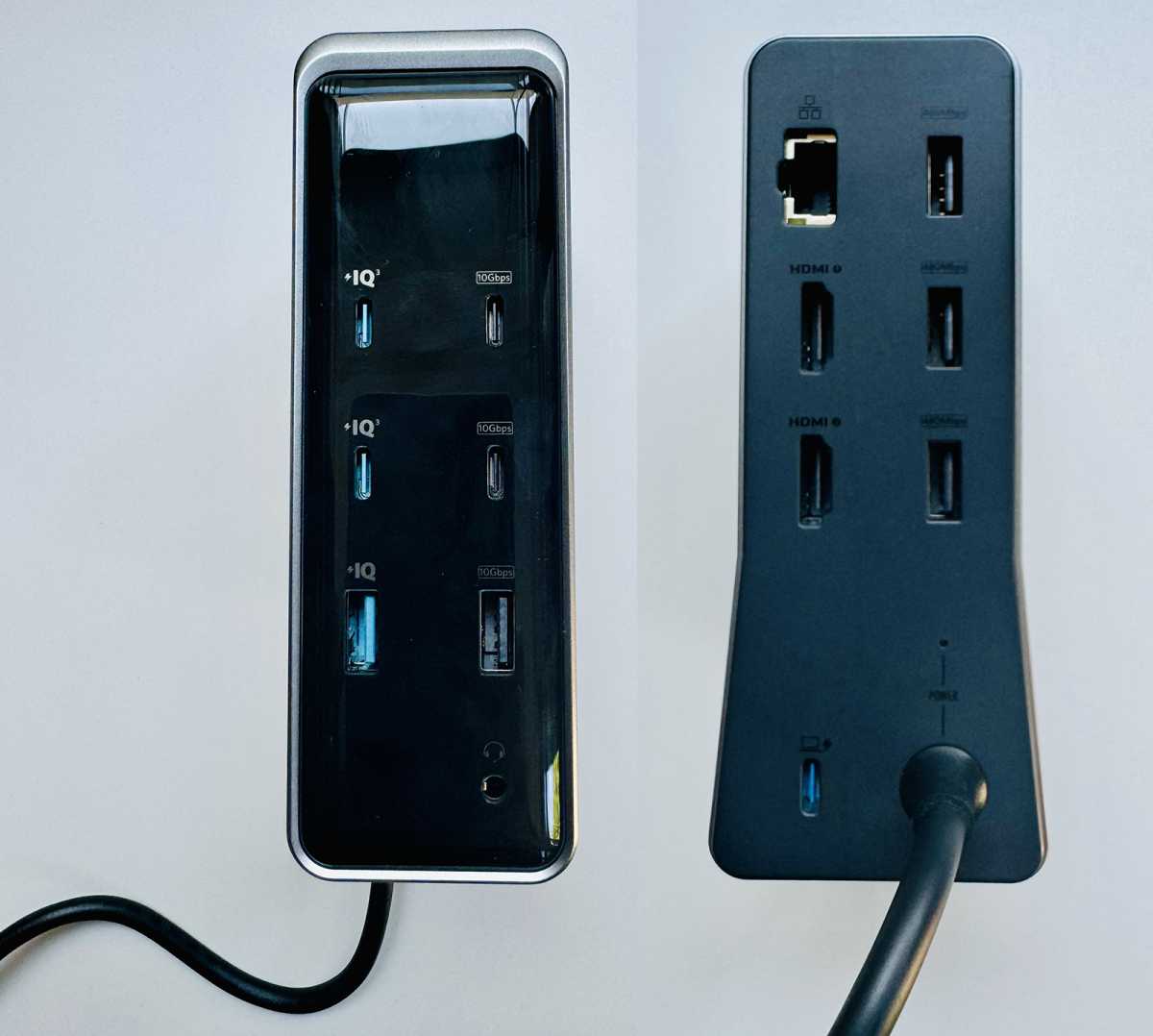
The Anker Prime 160W Charging Docking Station has an impressive 13 ports—plus the upstream USB-C port to connect to the host (likely your laptop). It is loaded with USB data and charging ports but also has most of the basics you’d expect on a dock.
Foundry
Foundry
Foundry
- 100W PD 3.0 charging via upstream USB-C port
- Up to two external displays (2x 4K at 60Hz)
- Two HDMI 2.0 ports
- Two USB-C (10Gbps) ports
- Two USB-C (100W) ports
- One USB-A (10Gbps) port
- One USB-A (12W) port
- Three USB-A (480Mbps) ports
- Gigabit Ethernet port
- Hybrid 3.5mm audio port
- 160W total power output
This compact and good-looking vertical-standing dock leans to its charging prowess, but the three front-mounted10Gbps data ports (two USB-C, one USB-A) should also be sufficient for most setups.
The available power beats all other docks into submission. Alongside the 10Gbops data ports are two USB-C ports, each of which can pump out 100W, and there’s another 12W available via one of the USB-A ports. Note that total power output is 160W, so you have that amount of power when using multiple ports simultaneously.
The dock doesn’t have a separate power supply. Instead it has an integrated GaN AC-DC power module. This space-saving design makes it potentially portable.
Its dimensions are 5.5 x 3.8 x 1.9 inches ( 14 x 9.7 x 4.7cm) and it weighs 1.96lb (888g).
It connects to a power source via its integrated 5.5ft (1.7m) power cable. If you need more reach to a power socket, you’ll need an extender.
There’s a Smart Mode that automatically allocates optimal charging power to each port based on the connected devices’ requirements; plus a Custom Mode so you can prioritize individual ports as you please. Ports can be set to “Power Priority” for higher power, “Power Saving” for reduced power, or “Balanced” for equal power distribution among ports.
There’s no SD or MicroSD card reader slot on this Anker dock, while some docks have both. If you don’t need it, you won’t miss it—but these cards can offer affordable and highly portable access to external storage. If you decide on one later, you can buy an SD Card Reader adapter that will use up one of the dock’s USB ports.
If you are looking for a dock with a wider roster of ports, check out our recommended best USB-C laptop docking stations. If you want a powerful desktop charger rather than a dock, then look at what our tests reveal as the best laptop PD chargers.
If you need both a docking station and a desktop charger, keep reading as this Anker dock is a great combination of both.
Many recent docking stations offer super-fast wired network access with a 2.5Gb Ethernet connection, but most networks are still 1Gb so the Gigabit Ethernet port will be fine for most. Again, you could upgrade later with a 2.5Gb Ethernet adapter connected to one of the USB-C data ports.
The dock’s small smart display gives visual feedback on power levels and port connection status. This feature is becoming popular on chargers and power banks. Most people will never bother looking at it, but it’s there in case you want to monitor power output.
It doesn’t show data-transfer rates between devices.
The Anker has an easy-to-reach on-off switch on top, which is a handy energy-saving touch, and stops a laptop from having its battery continually topped up, which could degrade it if left unplugged.
It ships with a 3.3ft (1m) 100W 10Gbps USB-C cable.
Dual display potential (limited for Macs)
The Anker Prime 160W Charging Docking Station can connect to up to two external displays. For Windows laptop that support DisplayPort Alt Mode, the docks can run two 4K displays at 60Hz refresh rate in extended mode via the two HDMI 2.0 ports.
None of the USB-C ports on the dock support video output, so they cannot be used to connect a monitor.
As macOS doesn’t support MST (Multi-Stream Transport) Macs can work with the dock with one or two external displays but the two would be mirrored—that is both showing the same screen image, although that can be different to the laptop’s own screen. For more Mac options, check out Macworld’s list of best docking stations for Mac.
Price
The Anker Prime 160W Charging Docking Station costs $249.99 / £199.99, which is a reasonable price for what is both a laptop dock and a desktop USB charging station.
Verdict
Anker’s Prime 160W Charging Docking Station 14-in-1 USB-C Dock is a great combination of dual-display 10Gbps dock and desktop charging station. There are USB-C docks with a wider variety of ports, but none that match it for top-end charging ports alongside a set of 10Gbps USB.


