
By using this site, you agree to the Privacy Policy and Terms of Use.
Accept
Viral Trending contentViral Trending content
  • Home
  • World News
  • Politics
  • Sports
  • Celebrity
  • Business
  • Crypto
  • Gaming News
  • Tech News
  • Travel
Reading: Windows 10 KB5040427 update released with Copilot changes, 12 other fixes
Notification Show More
Viral Trending contentViral Trending content
  • Home
  • Categories
    • World News
    • Politics
    • Sports
    • Celebrity
    • Business
    • Crypto
    • Tech News
    • Gaming News
    • Travel
  • Bookmarks
© 2024 All Rights reserved | Powered by Viraltrendingcontent
Viral Trending content > Blog > Tech News > Windows 10 KB5040427 update released with Copilot changes, 12 other fixes
Tech News

Windows 10 KB5040427 update released with Copilot changes, 12 other fixes

By admin 4 Min Read
Share
SHARE

Microsoft has released the KB5040427 cumulative update for Windows 10 21H2 and Windows 10 22H2 with 13 changes, including Microsoft Copilot now behaving like an app, providing more flexibility on how it is displayed.

The Windows 10 KB5040427 update is mandatory as it contains  Microsoft’s July 2024 Patch Tuesday security updates, which fix 142 vulnerabilities.

Windows users can install this update by going into Settings, clicking on Windows Update, and manually performing a ‘Check for Updates.’

However, as this update is mandatory, it will automatically start installing in Windows once you check for updates. To make this more manageable, you can schedule a time when your computer is restarted to finish the installation.
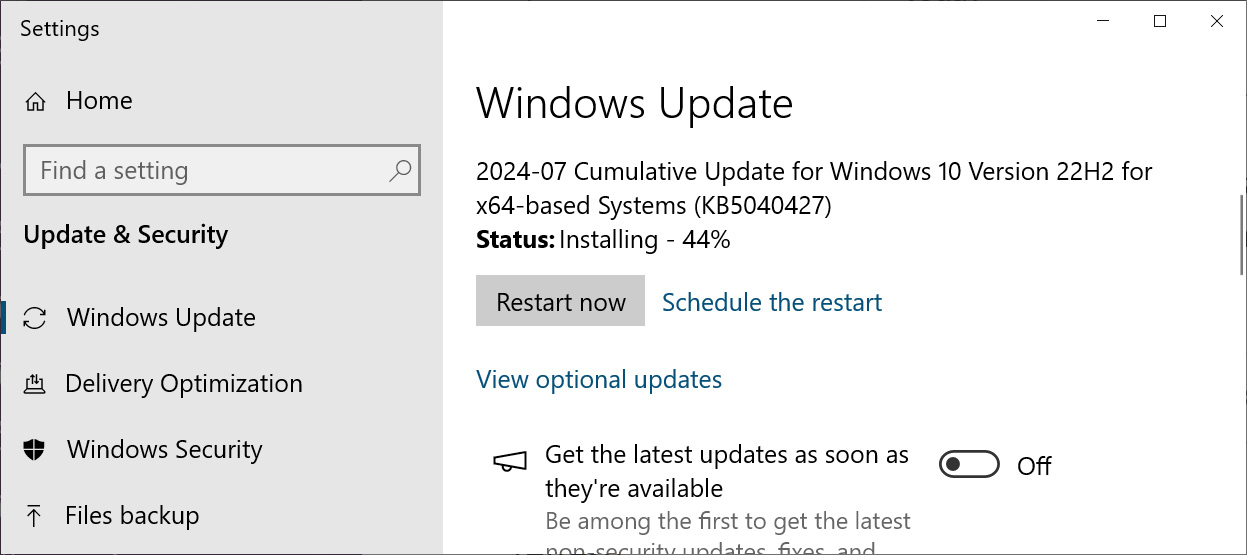
Windows 10 KB5040427 cumulative update preview
<strong>Windows 10 KB5040427 cumulative update preview</strong><br /><em>Source: BleepingComputer</em>

After installing this update, Windows 10 22H2 will be updated to build 19045.4651, and Windows 10 21H2 will be updated to build 19044.4651.

Windows 10 users can also manually download and install the KB5040427 update from the Microsoft Update Catalog.

What’s new in Windows 10 KB5040427

Recent Windows 10 updates are mostly bug fixes and improvements, but the KB5040427 update also includes new changes to Microsoft Copilot that will be gradually rolled out to users.

This update also includes a total of 13 fixes or changes, with the highlighted ones listed below:

  • Windows Installer. When it repairs an application, the User Account Control (UAC) does not prompt for your credentials. After you install this update, the UAC will prompt for them. Because of this, you might have to update your automation scripts. Do this by adding the Shield icon. It indicates that the process requires full administrator access. To turn off the UAC prompt, set the HKEY_LOCAL_MACHINESOFTWAREPoliciesMicrosoftWindowsInstallerDisableLUAInRepair registry value to 1.

  • Security update for Remote Authentication Dial-In User Service (RADIUS) protocol. This issue is related to MD5 collisions. For more information, see KB5040268.

  • New!  We are advancing the Copilot experience on Windows. The Copilot app is now pinned to the taskbar and behaves like an app. This gives you the benefits of a typical app experience. For example, you can resize, move, and snap the window. For existing Windows 10 PCs, the timing of availability and delivery method will vary. This might not be available to all users because it will roll out gradually. 

  • This update addresses an issue that affects an app’s jump list on the taskbar. Completing actions from that list might fail. A jump list is a menu that appears when you right-click an app on the taskbar or Start menu. It gives you quick access to recently or frequently used app items.

  • This update addresses an issue that affects the default Japanese Input Method Editor (IME). The candidate window stops responding when you do not expect it. Then, it goes back to a former composition state at random.

  • This update addresses a known issue that might occur when you right-click some apps. Instead of running the task you choose from the context menu, an “Open with” dialog appears. It asks you, “How do you want to open this file?” This issue might affect any app that has tasks on a context menu. This issue also affects the icons on the taskbar and Start menu.

Unfortunately, two known Windows 10 issues persist with this update, including Microsoft Connected Cache (MCC) node discovery being broken when using DHCP Option 235 and users receiving 0x80070520 errors when attempting to change their account profile pictures.

A full list of fixes can be found in the KB5040427 support bulletin and last month’s KB5037849 preview update bulletin.

You Might Also Like

What Is a Preamp, and Do I Really Need One?

Your guide to complete visibility

How do you dispose of old batteries? Derry Cronin, Business Development Director of EHS International

CSA Issues Alert on Critical SmarterMail Bug Allowing Remote Code Execution

Vodafone Foundation and Rethink Ireland announce recipients of €540,000 Fund to Boost Digital Literacy for Older Adults

TAGGED: Cumulative Update, Microsoft, Patch Tuesday, Security Update, Vulnerability, Windows 10, Windows Update
Share This Article
Facebook Twitter Copy Link
Previous Article Fed's Jerome Powell: "More good data" will "strengthen" case for rate cut
Next Article Nike Is Killing the App for Its $350 Self-Tying Sneakers
Leave a comment

Leave a Reply Cancel reply

Your email address will not be published. Required fields are marked *

- Advertisement -
Ad image

Latest News

Citi edges closer to Russia exit, bracing for over €1bn hit
Business
Steam's best selling PC games list show 2025 was wild
Gaming News
Zcash price prediction for January 2026: Arthur Hayes predicts $1000
Crypto
Exclusive: Eva Kaili doubles down on ‘Belgiangate’ after fresh wave of Brussels scandals
World News
John F. Kennedy’s Grandchildren: See Photos of Rose, Tatiana & Jack Schlossberg
Celebrity
Metal Gear Solid Delta: Snake Eater is a Love Letter to Action Cinema
Gaming News
ChatGPT thinks these are the 5 best FTSE stocks to consider buying for 2026!
Business

About Us

Welcome to Viraltrendingcontent, your go-to source for the latest updates on world news, politics, sports, celebrity, tech, travel, gaming, crypto news, and business news. We are dedicated to providing you with accurate, timely, and engaging content from around the globe.

Quick Links

  • Home
  • World News
  • Politics
  • Celebrity
  • Business
  • Home
  • World News
  • Politics
  • Sports
  • Celebrity
  • Business
  • Crypto
  • Gaming News
  • Tech News
  • Travel
  • Sports
  • Crypto
  • Tech News
  • Gaming News
  • Travel

Trending News

cageside seats

Unlocking the Ultimate WWE Experience: Cageside Seats News 2024

Steam's best selling PC games list show 2025 was wild

Investing £5 a day could help me build a second income of £329 a month!

cageside seats
Unlocking the Ultimate WWE Experience: Cageside Seats News 2024
May 22, 2024
Steam's best selling PC games list show 2025 was wild
December 30, 2025
Investing £5 a day could help me build a second income of £329 a month!
March 27, 2024
Brussels unveils plans for a European Degree but struggles to explain why
March 27, 2024
© 2024 All Rights reserved | Powered by Vraltrendingcontent
  • About Us
  • Contact US
  • Disclaimer
  • Privacy Policy
  • Terms of Service
Welcome Back!

Sign in to your account

Lost your password?