
By using this site, you agree to the Privacy Policy and Terms of Use.
Accept
Viral Trending contentViral Trending content
  • Home
  • World News
  • Politics
  • Sports
  • Celebrity
  • Business
  • Crypto
  • Gaming News
  • Tech News
  • Travel
Reading: Microsoft restricts IE mode access in Edge after zero-day attacks
Notification Show More
Viral Trending contentViral Trending content
  • Home
  • Categories
    • World News
    • Politics
    • Sports
    • Celebrity
    • Business
    • Crypto
    • Tech News
    • Gaming News
    • Travel
  • Bookmarks
© 2024 All Rights reserved | Powered by Viraltrendingcontent
Viral Trending content > Blog > Tech News > Microsoft restricts IE mode access in Edge after zero-day attacks
Tech News

Microsoft restricts IE mode access in Edge after zero-day attacks

By admin 3 Min Read
Share
SHARE

Microsoft is restricting access to Internet Explorer mode in Edge browser after learning that hackers are leveraging zero-day exploits in the Chakra JavaScript engine for access to target devices.

The tech giant did not share too many technical details but said that the threat actor combined social engineering with an exploit in Chakra to gain remote code execution.

“The [Edge security] team recently received intelligence indicating that threat actors were abusing Internet Explorer (IE) mode within Edge to gain access to unsuspecting users’ devices,” says Gareth Evans, Microsoft Edge Security Team Lead.

Although support for Internet Explorer ended on June 15, 2022, Microsoft Edge has an IE mode for legacy compatibility with older technologies (ActiveX and Flash) still in use with a small set of business applications and government portals.

In August, the Edge security team learned that threat actors were directing targets to “an official-looking spoofed website” that prompted users, through an interface element, to load the page in IE mode.

After exploiting the zero-day in Chakra, the attacker leveraged a second vulnerability to increase privileges and escape the browser, and take full control of the device.

Evans did not provide identifiers for the exploited vulnerabilities and said the flaw in Chakra is unpatched.

To mitigate the risk, Microsoft removed the methods that allowed activating IE mode in Edge through easy methods, like the dedicated toolbar button, context menu, and items in the hamburger menu.

Users who want IE mode active now have to navigate to Settings > Default Browser > Allow and define the pages that should be loaded using Internet Explorer.
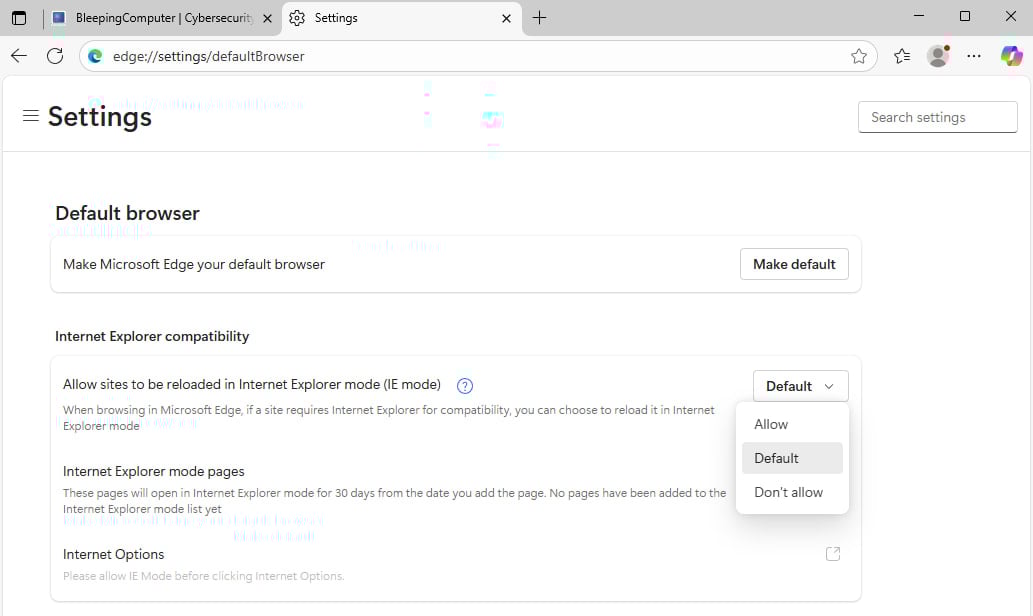
Edge setting for IE mode
<strong>Edge setting for IE mode</strong><br /><em>Source: BleepingComputer</em>

The new restrictions aim at making the activation of IE mode an intentional user action. Furthermore, the list of websites approved to load in IE mode should make it very difficult for attackers to succeed in their compromise attempts.

These changes do not apply to commercial users, who will continue to use IE mode as configured through enterprise policies.

However, Microsoft reminded users that they should migrate from the legacy web technology in Internet Explorer to modern products that deliver better security, are more reliable, and come with improved performance.

Picus BAS Summit

Join the Breach and Attack Simulation Summit and experience the future of security validation. Hear from top experts and see how AI-powered BAS is transforming breach and attack simulation.

Don’t miss the event that will shape the future of your security strategy

You Might Also Like

Best Fitness Tracker 2026: Fitbits, Bands & Hybrids

Your Photos Are Probably Giving Away Your Location. Here’s How to Stop That

Critical Fortinet Forticlient EMS flaw now exploited in attacks

21 organisations currently adding to their engineering teams

M5 Ultra Mac Studio Leaks: 8K Video and GPU Benchmarks

TAGGED: Actively Exploited, Microsoft, Microsoft Edge, Vulnerability, Zero-Day
Share This Article
Facebook Twitter Copy Link
Previous Article CEO says she’d welcome an AI-bot board member: ‘If you don’t have an AI agent in every meeting, you’re missing out’
Next Article NFL bans Lions' Branch for one game after punching opponent
Leave a comment

Leave a Reply Cancel reply

Your email address will not be published. Required fields are marked *

- Advertisement -
Ad image

Latest News

“Stand Ready for My Arrival, Worm”: Invincible VS Adds Conquest as Final Launch Fighter
Gaming News
As the Iran war drags on, ‘shell-shocked’ CEOs may soon break their silence on Trump
Business
XRP price outlook: relief bounce driven by Ripple CEO optimism
Crypto
Dimension 20 Is Finally Doing A Vampire: The Masquerade Campaign And I Am So Stoked
Gaming News
Brush up: How to plan a creative holiday in Europe
Travel
Best Fitness Tracker 2026: Fitbits, Bands & Hybrids
Tech News
Your Photos Are Probably Giving Away Your Location. Here’s How to Stop That
Tech News

About Us

Welcome to Viraltrendingcontent, your go-to source for the latest updates on world news, politics, sports, celebrity, tech, travel, gaming, crypto news, and business news. We are dedicated to providing you with accurate, timely, and engaging content from around the globe.

Quick Links

  • Home
  • World News
  • Politics
  • Celebrity
  • Business
  • Home
  • World News
  • Politics
  • Sports
  • Celebrity
  • Business
  • Crypto
  • Gaming News
  • Tech News
  • Travel
  • Sports
  • Crypto
  • Tech News
  • Gaming News
  • Travel

Trending News

cageside seats

Unlocking the Ultimate WWE Experience: Cageside Seats News 2024

As the Iran war drags on, ‘shell-shocked’ CEOs may soon break their silence on Trump

Investing £5 a day could help me build a second income of £329 a month!

cageside seats
Unlocking the Ultimate WWE Experience: Cageside Seats News 2024
May 22, 2024
As the Iran war drags on, ‘shell-shocked’ CEOs may soon break their silence on Trump
March 30, 2026
Investing £5 a day could help me build a second income of £329 a month!
March 27, 2024
Brussels unveils plans for a European Degree but struggles to explain why
March 27, 2024
© 2024 All Rights reserved | Powered by Vraltrendingcontent
  • About Us
  • Contact US
  • Disclaimer
  • Privacy Policy
  • Terms of Service
Welcome Back!

Sign in to your account

Lost your password?