





Created by John Tuckner and the team at automation and AI-powered workflow platform Tines, the SOC Automation Capability Matrix (SOC ACM) is a set of techniques designed to help security operations teams understand their automation capabilities and respond more effectively to incidents.
A customizable, vendor-agnostic tool featuring lists of automation opportunities, it’s been shared and recommended by members of the security community since its launch in January 2023, notably by Airbnb engineer Allyn Stott in his BSides and Black Hat talk, How I Learned to Stop Worrying and Build a Modern Detection & Response Program.
The SOC ACM has been compared to the MITRE ATT&CK and RE&CT frameworks, with one user saying, “it could be a standard for classification of SOAR automations, a bit like the RE&CT framework, but with more automation focus.” It’s been used by organizations in Fintech, Cloud Security, and beyond, as a basis for assessing and optimizing their security automation programs.
Here, we’ll take a closer look at how the SOC ACM works, and share how you can use it in your organization.

What is the SOC Automation Capability Matrix?
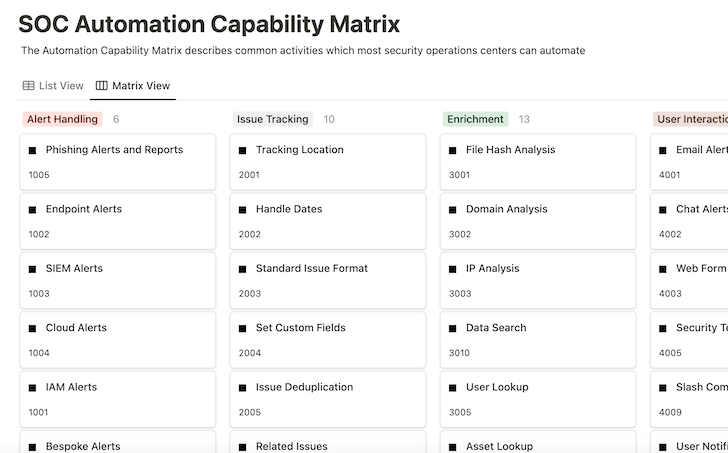
The SOC Automation Capability Matrix is an interactive set of techniques that empower security operations teams to respond proactively to common cybersecurity incidents.
It’s not a list of specific use cases related to any one product or service, but a way to think about the capabilities an organization might follow.
It offers a solid foundation for beginners to understand what’s possible with security automation. For more advanced programs, it serves as a source of inspiration for future implementations, a tool to gauge success, and a means to report outcomes.
While the tool is vendor-agnostic, it pairs well with a platform like Tines, which was developed by security practitioners to help fellow security practitioners enhance their mission-critical processes through workflow automation and AI
How does the SOC Automation Capability Matrix work?
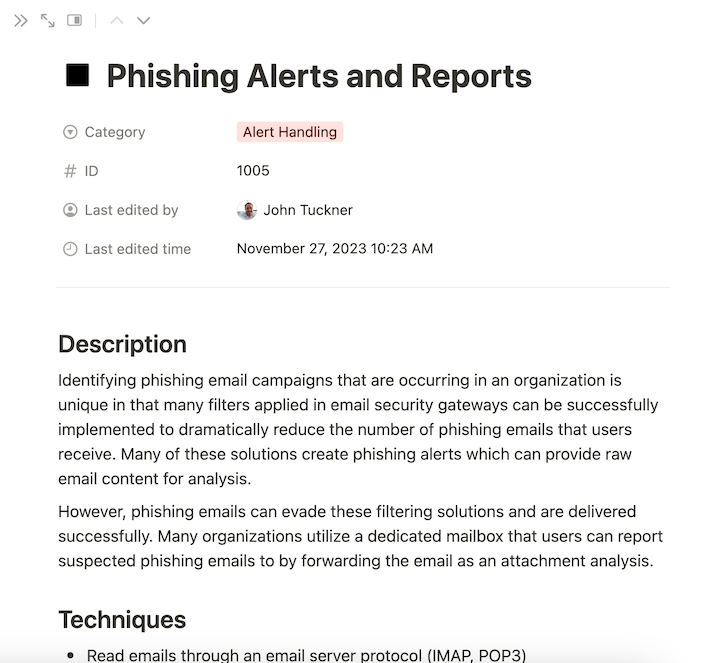
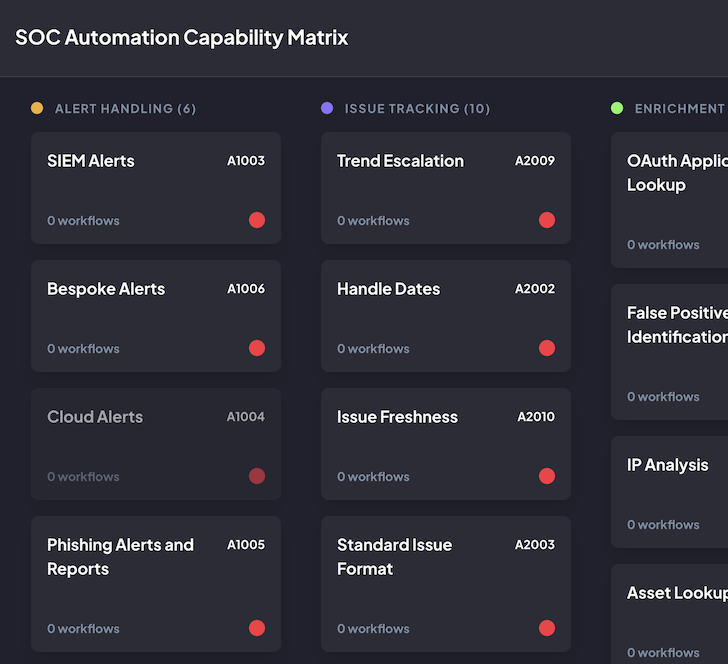
The SOC ACM is split into categories that contain automation capabilities.
Each capability comprises:
- Description – a brief overview of what the capability is doing
- Techniques – technology-agnostic ideas for how to implement the capability
- Examples – relevant workflow templates from the Tines library
- References – other research contributing to the capability
The framework reads from left to right and top to bottom within categories. While it is minimally opinionated about which capabilities bring the most value or are easier to implement, the framework is adaptable to what organizations find most valuable.
Each capability can stand alone in the matrix, but joining many capabilities together can produce many more complex and impactful outcomes.
How to use the SOC Automation Capability Matrix
Next, we’ll illustrate how to use the SOC ACM, taking phishing response as our example. Many organizations utilize multiple techniques to find and analyze suspicious messages to respond appropriately to malicious emails.
To start, here are some processes a routine phishing investigation might include:
- Receive a phishing email or alert
- Send a notification to the security team for processing
- Create a ticket to track and record the analysis
- Review the elements of the email, including attachments, links, and email message headers
- If suspicious, delete the email and add features to blocklists
- Send a notification to the recipient with a status update
Within the matrix capability, Phishing Alerts appear in the Alert Handling section; it mentions that many organizations implement tools like email security gateways to prevent suspicious emails from being delivered to inboxes while also generating alerts of attack campaigns that could be automated.
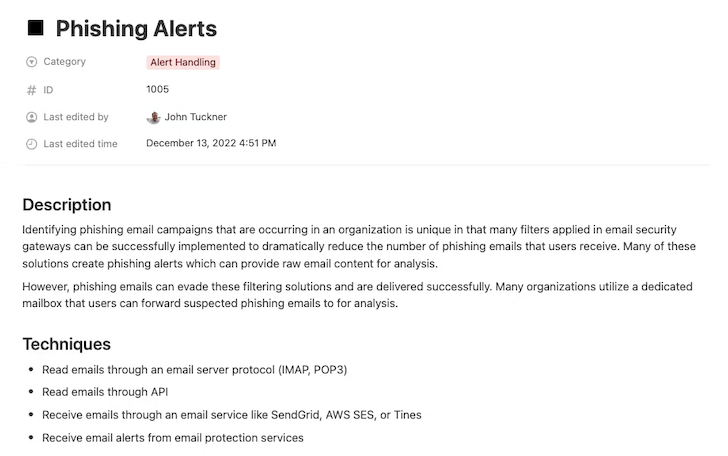
The capability also outlines a strategy to create a purposeful inbox for users to easily forward phishing emails that may have passed through the filters. Implementing both of these capabilities offers an opportunity to begin an automation workflow.
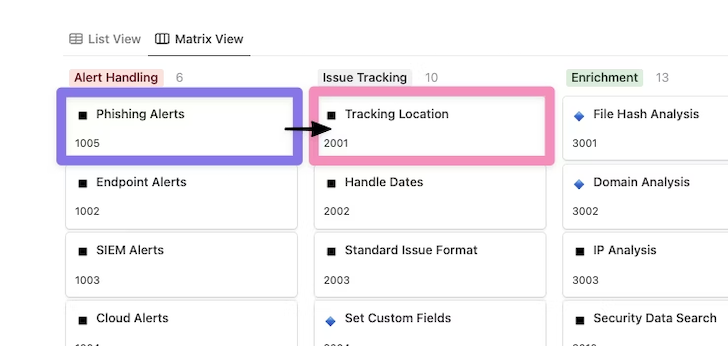
Once a suspicious message has been identified, either through the user reporting or generated alert, more automation capabilities become available. One recommendation is to create a location for tracking the lifecycle of each alert as soon as possible.
Utilizing the Tracking Location capability in the Issue Tracking section, we can identify where these alerts should be recorded, updated, and reported. Notice how the workflow has now moved between sections of the Automation Capability Matrix to extend the process.
With the alert and tracking location decided on, we can move towards performing a thorough analysis of the phishing alert in question. Phishing emails commonly contain potentially malicious attachments and suspicious links to capture authentication material and are typically sent from spoofed sources.
Moving into the Enrichment phase, we want to focus on utilizing a few key capabilities at a minimum: Domain Analysis for any links present in the email body, File Hash Analysis/File Analysis to look at any attachments to the email, and Email Attributes to look deeper into email headers for signs of emails from spoofed addresses.
For Enrichment opportunities, the number of options for API-driven tools and services that can be used to provide these capabilities grows exponentially. Some common options include VirusTotal for files, URLscan for domains, and EmailRep for sender information. Each of these enrichment results can be recorded in the associated tracking location identified previously to document the outcomes and provide analysts with a view into the results.
This shows how many capabilities from the same section can be applied to the same automation workflow, in this case, to provide as much information as possible to analysts.

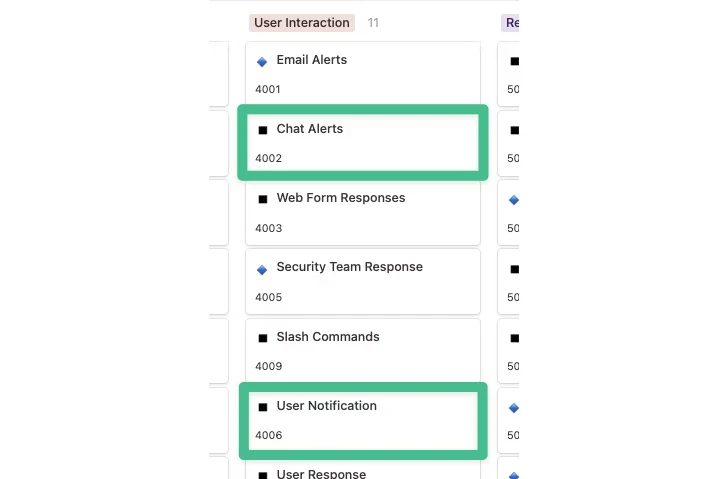
After enrichment occurs, a verdict might be reached already, but more likely, the issue will require a quick review from an analyst. At this point, the User Interaction section becomes critical.
To start, we can use Chat Alerts to notify the security team in a Slack channel that a phishing email has arrived and a tracking issue has been created, with various enrichment details added as additional context is ready for review.
That takes care of informing the security team, but what about updating any users who might be impacted or who reported the email? Phishing response processes, in particular, are unique because many organizations actively train users to report emails they might identify as suspicious. Informing these users with a confident verdict within a short timeframe is a great way to empower operations such as getting sensitive documents signed quickly or preventing mass malware outbreaks.
To do this, we can use the User Notification capability to identify the user who reported the email and provide them with the results of the email analysis. In the case of User Interaction, it’s not only about additional notification of the security team but also extending the reach and empowering others with real-time information to make the right decisions.
At this point, a lot of activity has taken place, and we have a lot of knowledge at our disposal. While more information is always helpful, acting on it appropriately is what ultimately counts most, resulting in the remediation phase. Many of the data points (indicators) we gathered before can be used for remediation action. Depending on how the situation has played out, we could take some of the following steps:
- Domain blocklist: Add any domains and URLs identified as suspicious to a blocklist.
- File hash blocklist: Add any file hashes identified as malicious to a blocklist.
- Email deletion: Remove emails related to an attack campaign from inboxes.
- Password invalidation: Change the passwords of any users found to have submitted credentials to a phishing website.

The key to any remediation is knowing what’s possible and starting small, especially when utilizing automation to build confidence. One way to do this is to provide links or buttons that need to be manually clicked to take remediation actions, but in a repeatable manner. If you want to introduce full automation, keeping lists of suspicious domains that can be blocked provides you with great utility, minor risk, and can be fixed quickly with little overall impact when errors occur.
Looking at the process end-to-end, we have utilized the following capabilities to help automate critical actions for many cybersecurity teams:
- Phishing alerts
- Tracking location
- File hash analysis
- Domain analysis
- Email attributes
- Chat alerts
- User notification
- Domain blocklist
- File hash blocklist
- Email deletion
- Password invalidation
A significant benefit of developing these capabilities in your organization to address a single process, such as phishing, is that many of these capabilities are now available to be reused for additional purposes like malware detection or handling suspicious logins, making each subsequent automation opportunity easier.
Customizing the matrix
The SOC ACM is also available on GitHub for those who prefer to run it themselves or contribute.
This way, the SOC ACM can be fully customized to fit your needs. This includes:
- Adding new categories and capabilities
- Reorganizing according to your priorities
- Tracking automation workflows that align with these capabilities
- Exporting the configuration
- Dark and light mode
You can also assess different environments or different organizations differently by creating separate boards. For example, if your organization acquires a company with different capabilities from yours, you can use the matrix to visualize that environment completely differently.
All of this configuration can be stored locally in your browser for privacy. As well as exporting the configuration, you can import it to revive past assessments, all without a login account, and without any tracking.
The SOC ACM as a reporting tool
Teams accessing the SOC ACM on GitHub can also use the matrix to visually demonstrate where they are in their automation journey and communicate the value of their automation program to leadership and other key stakeholders.
Soon after implementing a few capabilities, teams will understand which capabilities they’re utilizing most, the associated activities, and their value, such as time saved or reduced response time. This enables them to share results with relevant teams and decide what to prioritize next.
Case study: tracking time saved and executions to show value with the SOC ACM
At the Tines Roadshow: San Francisco, the creator of the SOC Automation Capability Matrix, John Tuckner, shared how he worked with a Fintech company to assess and enhance their automation program using the matrix. They told Tuckner, “The Automation Capability Matrix helps us organize our workflows, identify which workflows are saving us the most time, and highlight future areas of opportunity.”
Highlights:
- 25 capabilities implemented and tagged
- 10 workflows utilizing Slack slash commands with 2,000 executions
- Send multifactor prompt workflows ran 721 times for 6.5 hours of time savings per month
Recommendations:
- Look at managing lists of IOCs for response capabilities, “IP list,” “domain list,” and “hash list.”
- Document and highlight the efforts made in time saved when utilizing case management.
Future state – what they’ll do differently:
- Tackling distributed alerting, user interaction via Slack
- User notification
- User response
- Updating security Slack channel and incident reporting to use a Slack bot and route reports and asks to the correct subteam
- Notify emergency resources
- Timed escalations
- Slash commands
- Add more response actions via Tines automation through our Slack bot
- Artifact gathering
- Disabling MFA device
- Asset lookup (not just endpoints, need to include cloud assets)
The SOC Automation Capability Matrix is a useful resource for teams at all stages in their automation journey, providing inspiration for their next automation builds and a means to assess their automation program.
If you’d like to explore the SOC Automation Capability Matrix in more detail, you’ll find it on Notion, hosted by the Tines team.


