




Has this happened to you? You just opened your new PlayStation VR2 and everything seems fine. The setup goes swimmingly. You’ve got a handle on the controls, and you enter a game of your choice. Except, hold on a second—why don’t some of the buttons on your controller work? Everything worked before you were in a game, and your motion controls seem to function correctly in both hands. Is this some kind of software glitch? What is the deal?
If this is the boat you’re in, don’t worry, you’re not alone. I went through the hassle of troubleshooting this myself with my own PlayStation VR2, and the experience was such a pain that I’m here to make sure you (hopefully) don’t go through the same ordeal I did. Fortunately, this issue is fixable without taking your controller apart, but the process gets so silly that you might think I’m kidding as I describe it. Let’s break it down.
How to check for hardware issues
Before trying to fix your controller, you want to make sure that your controller actually needs to be fixed. For full disclosure, many of the details below come courtesy of the r/PSVR subreddit, as explained by helpful comments like this one by Redditor Babydrone. Thanks everyone!

To check if your controller is having issues, follow these steps:
1: Plug your problem controller into your computer. The USB cable that came with your unit will work for this.
2: Head to https://hardwaretester.com/gamepad .
3: Look for the number below Axis 2. Now press down and release the trigger (AKA either R2 or L2). When it is fully pressed down, it should read 1.00000. And when you release the trigger, it should read –1.00000.
4: If everything looks good, test your other controller. You have two after all, and you might not have grabbed the offending unit.
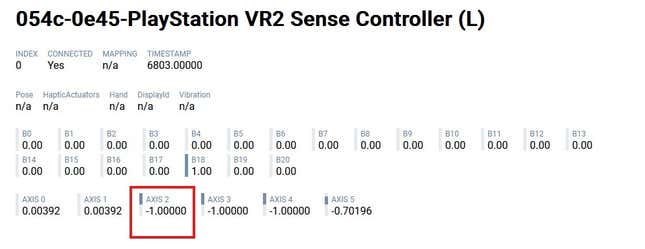
If you see any other numbers below Axis 2 when the trigger is released, your controller has an issue for you to fix. The value also needs to hold steady at -1.00000 to totally work properly, so if you see the number flicker between two different values when you aren’t pressing it, there’s an issue.
How to fix your controller’s faulty trigger
Technically, at this point you could choose to exchange your VR kit or go through Sony’s official support channels. However, I personally tried exchanging my unit and wound up with the exact same issue again, so I recommend this at-home fix below (don’t worry, you won’t have to take the controller apart).
The consensus appears to be that this specific faulty trigger issue is caused by debris stuck in the controller, so the goal is to keep trying to dislodge the gunk until your controller reads -1.00000 when released. To achieve this, take the following steps.
1: If you have contact cleaner, use that on your controller’s trigger.
2: Press the trigger down, and promptly release it so it flicks back up into place. Repeat this process. As you keep flicking the trigger, you should see the Axis 2 value slowly rise higher when it’s released.
3: If you don’t have contact cleaner, use compressed air on the trigger and keep flicking it. Some recommend blowing directly into the trigger, but considering how you shouldn’t blow on your Nintendo games, I personally didn’t feel comfortable doing this.
4: Lightly tap your controller on your desk and table, ideally at an angle so you press and release the trigger as you do. I generally found that holding the controller upside down so the trigger faces downwards seemed to move the issue along faster, but that could have been coincidence on my own.
Again, this is a slow process. It may take a few minutes of monotonous flicking of the trigger until you see any difference in the Axis 2 box. That said, all you can do is stick with it until you’re done. I recommend throwing on a podcast or watching that YouTube video essay you’ve been slowly working through while you chip away at your controller. Some controllers may be more “off” than others, so the time it takes you to fix this may vary.
That said, once you do fix this problem, you thankfully shouldn’t have to worry about it again. Now you can finally play Horizon Call Of The Mountain in peace.
.


