
By using this site, you agree to the Privacy Policy and Terms of Use.
Accept
Viral Trending contentViral Trending content
  • Home
  • World News
  • Politics
  • Sports
  • Celebrity
  • Business
  • Crypto
  • Gaming News
  • Tech News
  • Travel
Reading: Monster Hunter Wilds: How To Avoid Playing With Other People
Notification Show More
Viral Trending contentViral Trending content
  • Home
  • Categories
    • World News
    • Politics
    • Sports
    • Celebrity
    • Business
    • Crypto
    • Tech News
    • Gaming News
    • Travel
  • Bookmarks
© 2024 All Rights reserved | Powered by Viraltrendingcontent
Viral Trending content > Blog > Gaming News > Monster Hunter Wilds: How To Avoid Playing With Other People
Gaming News

Monster Hunter Wilds: How To Avoid Playing With Other People

By Viral Trending Content 5 Min Read
Share
SHARE

Whether you’re hunting in a link party or celebrating in the grand hub, Monster Hunter Wilds pushes you to join forces with other players. However, that might not always be your preference. Sometimes you want to play with those who are a bit more predictable and relaxed—and less “real.”

Disney+ Pulls The Abyss Over Controversial Rat Scene — Again

I occasionally enjoy taking on a difficult monster with NPCs that won’t waste my carts. Just bringing along my Palico also has its advantages, especially once they learned how to give a free revive. Let’s walk through how to set up some hunts with just Palicos or NPCs as companions, since the game doesn’t do the best job at providing details.

Capcom / Samuel Moreno / Kotaku

Screenshot<!-- -->: <!-- -->Capcom / Samuel Moreno / Kotaku

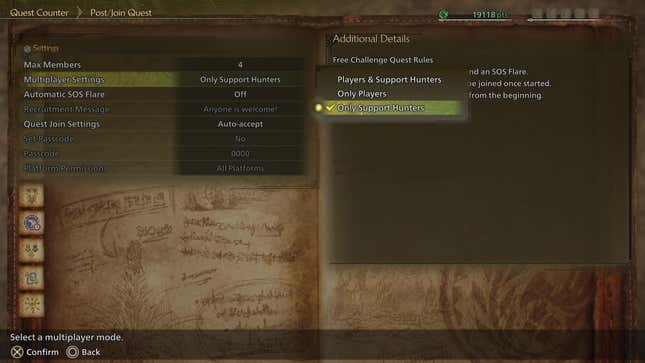
These changes are deceptively easy to make. If you want to only play with Support Hunter NPCs or with a mix of NPCs and your Palico, here’s how to set it up:

  • Access the Quest Counter menu through Alma, your tent, or at the physical counter in the Grand Hub
  • Select Post/Join Quest
  • Select Settings to find all the relevant options you need
  • Adjust the Max Member option to select how many Hunters can join a quest. A hunter will always take priority over a Palico, and yours will leave once a third or fourth member joins. Choosing two max members will let you hunt with one NPC and both of your Palicos
  • Adjust the Multiplayer Settings option to toggle between playing with real people, Support Hunters, or a mixture of both. The latter option simply has the game spawn in Support Hunters until they’re replaced by another online player

You’ll need to start a hunt to see these adjustments in action. Shoot off an SOS Flare and you can receive assistance from Alessa, Olivia, or Rosso. Keep in mind, though that each of these characters has a specific weapon: Alessa and Olivia are melee hunters who use a Lance and Hammer respectively, while Rosso is a ranged hunter with his Heavy Bowgun. This doesn’t matter if you’re planning on bringing them all along, but it can make a difference when you’re only having one or two of them join. A common issue for some is that the Support Hunter they receive is randomized. Fortunately, there is a way to change this!

While you’re looking at the Quest Counter Menu, go down to Quest Join Settings. You can set it to either Auto Accept or Manual Accept players trying to join your hunt. Surprisingly, this setting also applies to Support Hunters as well. Choosing the Manual Accept option means that all three Support Hunters will request approval, allowing you to choose which one joins.

How to adjust Support Hunter behavior

Support Hunters might not be able to land the last hit on an enemy, but they can unfortunately take away other opportunities. It’s a bittersweet feeling to see one mount a monster and then fail to inflict as many wounds as you could have. Thankfully, there are modifications to fine-tune what these NPCS do during combat. By heading into the Options menu and scrolling to the third page of the Game Settings tab, you can toggle the following under Support Hunter Settings:

The most hardcore of Monster Hunter players might want to turn most of these off, while the more casual hunters will take all the help they can get. There isn’t a right or wrong answer for how to change these settings. I suggest taking advantage of these options to better tailor your hunting experience.


Monster Hunter Wilds is available now on PS5, Xbox Series X/S, and Windows PCs.

You Might Also Like

Cult Hit Doki Doki Literature Club Fights Removal From Google Play Store Over ‘Depiction Of Sensitive Themes’

Dead as Disco Launches Into Early Access on May 5th, Groovy New Gameplay Released

Don’t Starve Elsewhere, A New Addition to Klei’s Survival Franchise, Announced for PC

A new Borderlands game just dropped, and it's free

Metal Gear Solid Film Greenlit By Sony, First Look in the Works

TAGGED: Game With PC, PC Online, xbox
Share This Article
Facebook Twitter Copy Link
Previous Article Mattel’s ChatGPT AI toy plans trigger panic
Next Article Israel expands war against Iran to target symbols of its power, including a notorious prison
Leave a comment

Leave a Reply Cancel reply

Your email address will not be published. Required fields are marked *

- Advertisement -
Ad image

Latest News

JPMorgan CEO Jamie Dimon says he’s ‘learned and relearned’ to not make big decisions when he’s tired on Fridays
Business
Apple AI Pin Specs Leak: Dual Cameras, No Screen & More
Tech News
A ‘glass-like’ battlefield: German Army chief on the future of warfare
World News
Polymarket Sees Record $153M Daily Volume After Chainlink Integration
Crypto
Natasha Lyonne Then & Now: See Before & After Photos of the Actress Here
Celebrity
Cult Hit Doki Doki Literature Club Fights Removal From Google Play Store Over ‘Depiction Of Sensitive Themes’
Gaming News
Dead as Disco Launches Into Early Access on May 5th, Groovy New Gameplay Released
Gaming News

About Us

Welcome to Viraltrendingcontent, your go-to source for the latest updates on world news, politics, sports, celebrity, tech, travel, gaming, crypto news, and business news. We are dedicated to providing you with accurate, timely, and engaging content from around the globe.

Quick Links

  • Home
  • World News
  • Politics
  • Celebrity
  • Business
  • Home
  • World News
  • Politics
  • Sports
  • Celebrity
  • Business
  • Crypto
  • Gaming News
  • Tech News
  • Travel
  • Sports
  • Crypto
  • Tech News
  • Gaming News
  • Travel

Trending News

cageside seats

Unlocking the Ultimate WWE Experience: Cageside Seats News 2024

Investing £5 a day could help me build a second income of £329 a month!

JPMorgan CEO Jamie Dimon says he’s ‘learned and relearned’ to not make big decisions when he’s tired on Fridays

cageside seats
Unlocking the Ultimate WWE Experience: Cageside Seats News 2024
May 22, 2024
Investing £5 a day could help me build a second income of £329 a month!
March 27, 2024
JPMorgan CEO Jamie Dimon says he’s ‘learned and relearned’ to not make big decisions when he’s tired on Fridays
April 10, 2026
Brussels unveils plans for a European Degree but struggles to explain why
March 27, 2024
© 2024 All Rights reserved | Powered by Vraltrendingcontent
  • About Us
  • Contact US
  • Disclaimer
  • Privacy Policy
  • Terms of Service
Welcome Back!

Sign in to your account

Lost your password?