
By using this site, you agree to the Privacy Policy and Terms of Use.
Accept
Viral Trending contentViral Trending content
  • Home
  • World News
  • Politics
  • Sports
  • Celebrity
  • Business
  • Crypto
  • Gaming News
  • Tech News
  • Travel
Reading: How to Download the Android 16 Beta Now
Notification Show More
Viral Trending contentViral Trending content
  • Home
  • Categories
    • World News
    • Politics
    • Sports
    • Celebrity
    • Business
    • Crypto
    • Tech News
    • Gaming News
    • Travel
  • Bookmarks
© 2024 All Rights reserved | Powered by Viraltrendingcontent
Viral Trending content > Blog > Tech News > How to Download the Android 16 Beta Now
Tech News

How to Download the Android 16 Beta Now

By Viral Trending Content 6 Min Read
Share
SHARE

Although we’re still waiting for the official release of Android 16, developers (and curious tech fans) do have a means of downloading and installing beta version on compatible phones and tablets.

Contents
How to opt into the Android 16 beta program on your phoneHow to download the Android 16 beta on your phoneWhich phones support the Android 16 beta?Which non-Pixel phones & tablets support the Android 16 beta?HonoriQooLenovoOnePlusOppoRealmeSharpVivoXiaomiRelated articles

We’ll probably have to wait for the Pixel 10 phones for it to arrive in full, but the exciting news is that many devices support Android 16 and the current QPR (Quarterly Platform Release) version includes the overhauled Material 3 Expressive user interface design.

Provided you’re comfortable with running an experimental and unfinished build of Android on your device ahead of launch, you can upgrade to Android 16 now and the process to enrol in the beta program, download and install it is fairly simple.

This article will guide you through the steps, make you aware of the risks involved and help you find out if you have a compatible device on which to get the Android 16 beta.

How to opt into the Android 16 beta program on your phone

Before you can download the latest Android 16 beta to your device, you’ll need to sign in to the Android Beta site using your Google account and choose to ‘opt in’ on the device you want to install it on.

Here’s how to opt-in with a few simple steps:

  1. Head to the Android Beta for Pixel site (making sure you’re logged into your Google account)
  2. Scroll down to the Your eligible devices section
  3. Read the T&Cs and FAQs for answers to any queries you may have before you download and install
  4. Select Opt in on the device you want to install Android 16 on
  5. Then head over to your newly registered phone
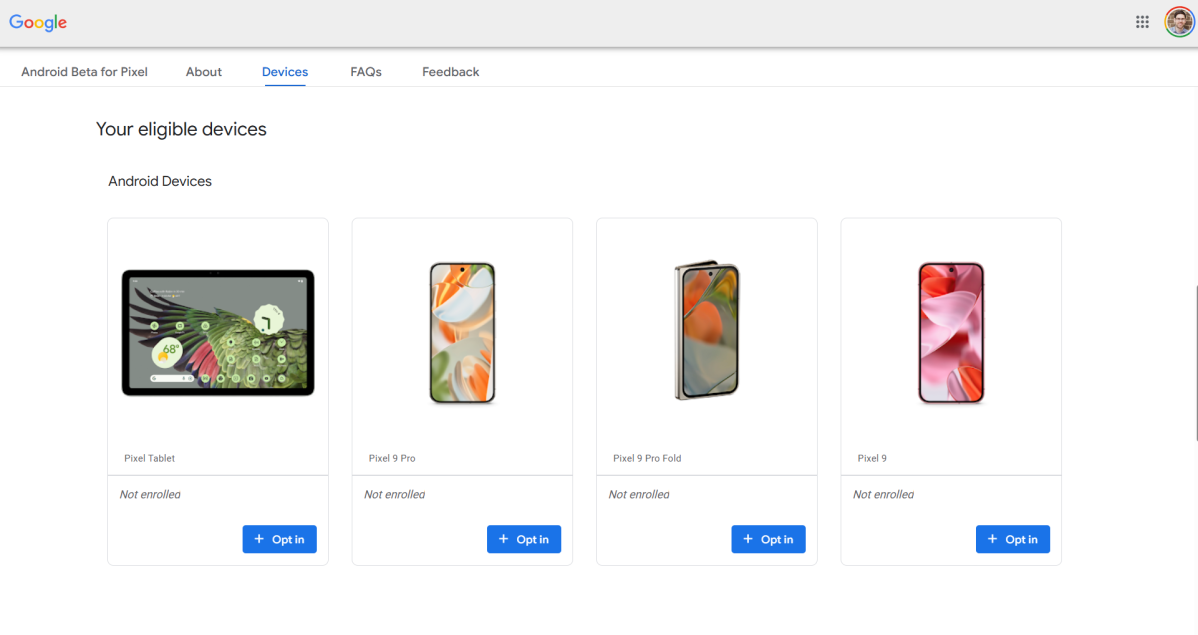
Android 16 beta eligible deviced enrol

Chris Martin / Foundry

WARNING: To quote the Android Beta site directly, “If you install a beta version, you may not be able to unenroll and revert back to a stable public release version of Android without first wiping all locally saved data on your device. You may also encounter issues restoring a backup.“

Provided you’re happy with this caveat, simply select Opt out under Your eligible devices, next to the device you previously selected Opt in on.

How to download the Android 16 beta on your phone
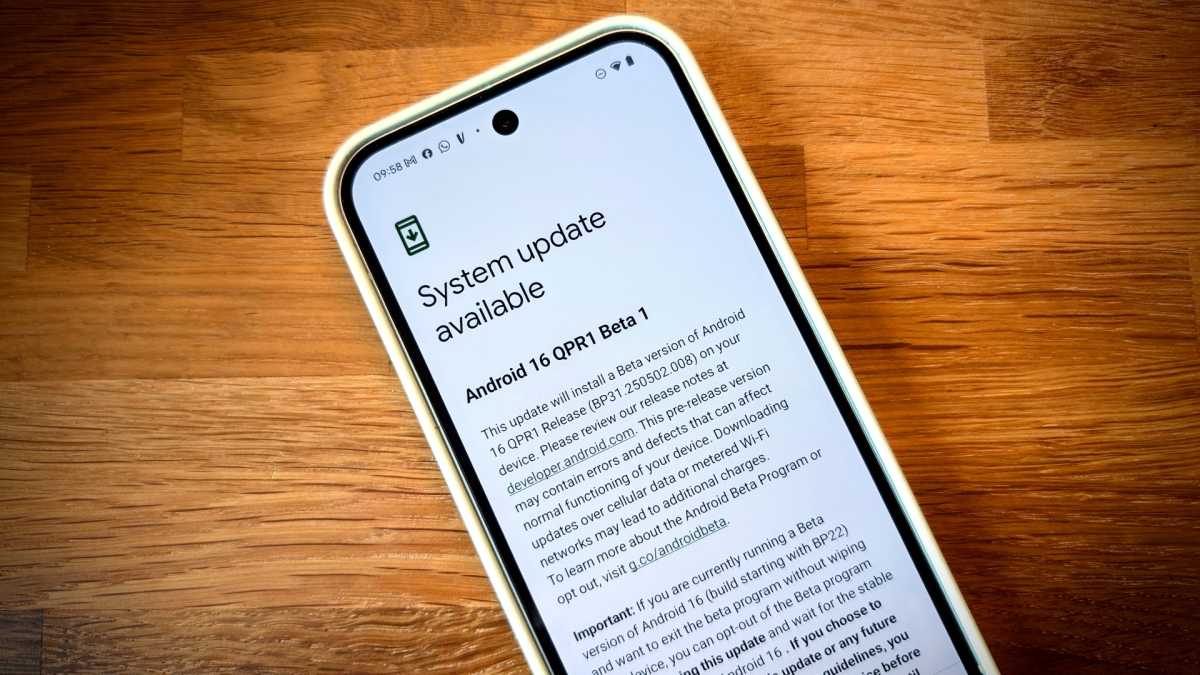
Android 16 QPR1 Beta on Pixel 9

Chris Martin / Foundry

For Pixel users, there are two ways to download and install the latest beta, the easiest being an OTA (over-the-air) update, similar to how you would download a normal OS (operating system) update, by doing the following:

  1. Open the Settings menu
  2. Scroll down and tap System, located near the bottom of the list
  3. Tap Software updates
  4. Then tap System update
  5. Your Pixel will then check for available OTA updates (if it doesn’t check automatically, tap the Check for update button)
  6. Once it finds an available update ready to download, tap on the Download and install button in the bottom corner of the screen

On the off chance the beta update isn’t immediately available, check back in a few hours, or simply wait until your phone notifies you that the beta update is ready to download. The method is expected to be largely the same on other eligible Android phones, but there may be some variation.

Alternatively, you can download the update manually via the official Android Flash Tool. However, this is only recommended if you really can’t wait or don’t want to use the more convenient OTA method.

Which phones support the Android 16 beta?

It should come as no surprise that the first place to look for Android 16 beta-compatible smartphones is Google’s own Pixel devices. The following list of phones can support the current beta release of Android 16:

It’s also worth noting that, for those curious about the tablet experience Android 16 will offer up, the Google Pixel Tablet is also compatible with the current Android 16 beta programme.

Which non-Pixel phones & tablets support the Android 16 beta?

If you’re keen to try out Android 16 but don’t have a compatible Pixel, worry not.

A handful of proactive device makers have signed up to become Android 16 ‘device-maker partners,’ meaning they also offer early access to Android 16, albeit with download methods, timeframes and sources that differ slightly to the Pixel method this article details.

Here’s the current list of compatible Android phones that support Android 16 beta releases. You can click the brands themselves to access each device maker’s respective download site:

Honor

iQoo

Lenovo

OnePlus

Oppo

Realme

Sharp

Vivo

Xiaomi

Related articles

You Might Also Like

Apple AI Pin Specs Leak: Dual Cameras, No Screen & More

The diverse responsibilities of a principal software engineer

OpenAI Backs Bill That Would Limit Liability for AI-Enabled Mass Deaths or Financial Disasters

Google’s Fitbit Tease has me More Excited for Garmin’s Whoop Rival

Why the TCL NXTPAPER 14 Is One of the Best Tablets for Musicians and Sheet Music Reading

TAGGED: cool tech, latest technology, latest technology news, new technology, science and technology, tech, Tech News, tech review, technews, technological advances, technology definition, technology reviews, what is technology
Share This Article
Facebook Twitter Copy Link
Previous Article UK unemployment hits 4-year high as pay growth cools
Next Article United Nations report highlights worrying global fertility crisis, 2025
Leave a comment

Leave a Reply Cancel reply

Your email address will not be published. Required fields are marked *

- Advertisement -
Ad image

Latest News

JPMorgan CEO Jamie Dimon says he’s ‘learned and relearned’ to not make big decisions when he’s tired on Fridays
Business
Apple AI Pin Specs Leak: Dual Cameras, No Screen & More
Tech News
A ‘glass-like’ battlefield: German Army chief on the future of warfare
World News
Polymarket Sees Record $153M Daily Volume After Chainlink Integration
Crypto
Natasha Lyonne Then & Now: See Before & After Photos of the Actress Here
Celebrity
Cult Hit Doki Doki Literature Club Fights Removal From Google Play Store Over ‘Depiction Of Sensitive Themes’
Gaming News
Dead as Disco Launches Into Early Access on May 5th, Groovy New Gameplay Released
Gaming News

About Us

Welcome to Viraltrendingcontent, your go-to source for the latest updates on world news, politics, sports, celebrity, tech, travel, gaming, crypto news, and business news. We are dedicated to providing you with accurate, timely, and engaging content from around the globe.

Quick Links

  • Home
  • World News
  • Politics
  • Celebrity
  • Business
  • Home
  • World News
  • Politics
  • Sports
  • Celebrity
  • Business
  • Crypto
  • Gaming News
  • Tech News
  • Travel
  • Sports
  • Crypto
  • Tech News
  • Gaming News
  • Travel

Trending News

cageside seats

Unlocking the Ultimate WWE Experience: Cageside Seats News 2024

Investing £5 a day could help me build a second income of £329 a month!

JPMorgan CEO Jamie Dimon says he’s ‘learned and relearned’ to not make big decisions when he’s tired on Fridays

cageside seats
Unlocking the Ultimate WWE Experience: Cageside Seats News 2024
May 22, 2024
Investing £5 a day could help me build a second income of £329 a month!
March 27, 2024
JPMorgan CEO Jamie Dimon says he’s ‘learned and relearned’ to not make big decisions when he’s tired on Fridays
April 10, 2026
Brussels unveils plans for a European Degree but struggles to explain why
March 27, 2024
© 2024 All Rights reserved | Powered by Vraltrendingcontent
  • About Us
  • Contact US
  • Disclaimer
  • Privacy Policy
  • Terms of Service
Welcome Back!

Sign in to your account

Lost your password?